



Does raspberry pi nas kit store data?
The Pi board itself? No. Well technically yes because there's that microSD card but that's your operating system, not where you're keeping files. What stores data are whatever drives you plug into it through USB or one of those SATA adapter boards.
When someone buys an "NAS kit" with a Raspberry Pi they're getting the Pi, maybe a case, sometimes drives included sometimes not. The Pi runs software like OpenMediaVault and talks to your network. Your actual files sit on external drives.
I set one up last year with the Argon EON case (argon40.com sells them) and it's been fine for media files and backing up photos from phones. That case holds four 3.5" drives and has a fan built in. Used three WD Red 4TB drives because that's what was on sale, ended up with about 8TB usable after setting up RAID 5.
The confusing part about "kits"
Not all kits are the same which makes answering this annoying. Some give you just the Pi and a case, you buy drives separate. Others include everything. The Argon one I bought was just the case and power supply, no drives, no Pi even though it's marketed as a "kit." Had to buy a Pi 4 8GB separately which was hard to find at the time because of chip shortages.
Most people asking this question want to know capacity, like how much data can you store. That's entirely dependent on what drives you add. Could be 2TB, could be 20TB. The Pi 4 has four USB 3.0 ports that all share bandwidth (5 Gbps total on the bus according to raspberrypi.com specs).
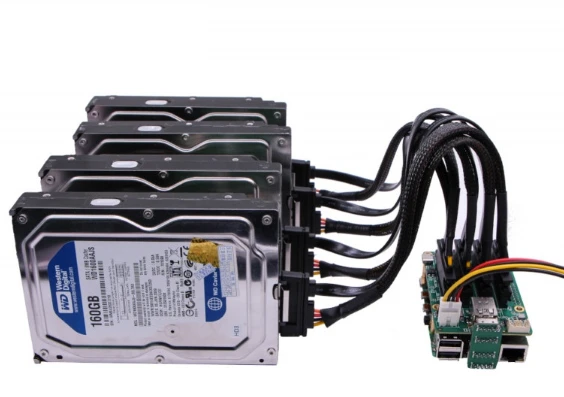
SATA adapters avoid that USB bottleneck but add cost and complexity. The Argon case uses a custom board that converts the Pi's GPIO to SATA connections which works better than USB for multiple drives.
Speed is where things get frustrating and nobody tells you this upfront - you're getting maybe 85MB/s sequential writes over the network on a good day. Someone tested this on raspberrypi.org/forums with the Argon case and that's what they got. For streaming movies that's plenty. For transferring hundreds of gigs, you'll be waiting.
The Pi 4's ethernet is gigabit now (older Pi 3 shared the ethernet with USB which was a disaster) but you still won't max it out because the CPU gets in the way processing file transfers.
MicroSD cards die and nobody warns you enough
Your OS lives on a microSD card and these things fail constantly from all the writing. I went through two Samsung EVO cards before switching to their Endurance line which supposedly handles more write cycles. Still expecting it to die eventually.
Some people run the OS from a USB SSD instead which is smarter but I haven't bothered to redo my setup. When the card dies I'll probably just restore from backup and buy another $15 card instead of reconfiguring everything.

What I wish someone told me before building this
Power supply matters way more than you'd think. The official Pi power adapter is 5V/3A which seems fine until you add drives that each pull 2 amps during startup. Had undervoltage warnings constantly until I got the Argon's included 5A power brick.
RAID takes forever on ARM processors. Rebuilding parity after adding a drive took almost 24 hours. The Pi 4's BCM2711 quad-core runs at 1.5GHz which sounds okay but RAID calculations chew through CPU. During that rebuild my transfer speeds dropped to like 20MB/s and Plex streams kept buffering.
Temperature is something cheap kits ignore. Pi 4 throttles at 80°C and it'll hit that easy with drives generating heat. I stuck a heatsink on the CPU and the Argon case has a fan that actually works, stays around 55-60°C under load now.
File system choice is weirdly important. I went with ext4 because it's standard Linux but that means Windows machines on my network can't directly mount drives if I pull them out. Should've used exFAT or NTFS but those have their own problems with Linux permissions.
Is this cheaper than buying a Synology?
I spent about $580 total - $75 for the Pi 4, $140 for the Argon case, $240 for three drives, plus microSD card and cables. A 4-bay Synology DS420+ costs around $350 without drives. Add the same three WD Red drives and you're at $590.
So no, building a Pi NAS didn't actually save money. What it did do is let me learn how this stuff works and customize everything. Running Pi-hole for network-wide ad blocking on the same device. Can't do that on a locked-down Synology.
For someone who just wants storage that works and doesn't want to mess with Linux commands, buy the Synology. It'll be easier and more reliable. For tinkering and learning, build the Pi setup.
Random issues I've hit:
SMB shares randomly disconnecting from my Mac, had to adjust some config file that I don't remember
USB drives not mounting after a reboot sometimes, fixed by getting a powered USB hub even though that wasn't supposed to be necessary
OpenMediaVault web interface timing out when doing large file operations, still haven't figured that one out
Transfer speeds vary wildly depending on what you're moving. Big video files go fast, like 90MB/s. Thousands of small files slow to a crawl, maybe 15-20MB/s because of overhead. NFS is supposedly faster than SMB but then Windows machines can't connect properly without third-party software.
The 3-2-1 backup thing everyone mentions is right though - don't trust any single device. My Pi NAS is one copy, desktop drives are another, Backblaze B2 is the third. House fire doesn't care about your RAID configuration.
Things that surprised me
Noise isn't bad. 5400 RPM drives in the Argon case are quieter than I expected. Can hear them seeking if the room's dead silent but it's not annoying. Way quieter than my desktop PC fans.
Power draw is low which is nice - measured about 18W total under load with all three drives active. Idle is closer to 8W with drives spun down. That's from a Kill-A-Watt meter so somewhat approximate.
Reliability has been okay so far. One drive threw some SMART errors after six months and I replaced it under warranty. The RAID rebuild took forever but data was fine. Can't speak to long-term durability since I've only run this for about 14 months.
You need to understand basic Linux to maintain this thing. Updating packages, checking logs when something breaks, editing config files through SSH. Not impossible to learn but definitely a time investment. Synology's web interface does most of this automatically.
Would I build another one? For a home project where I'm learning stuff, yes. As a serious backup solution for work files or irreplaceable data, no. The components are too consumer-grade and there's no support if something weird happens. That's fine for my use case but wouldn't trust it for anything critical.