





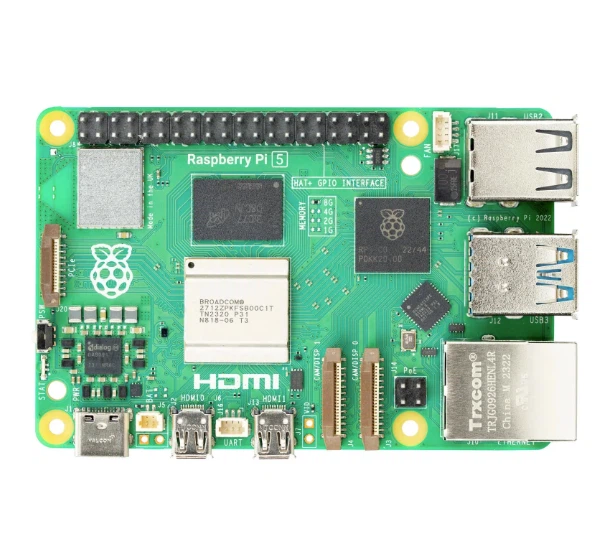
Can Raspberry Pi Kit Gaming Replace Consoles?
Raspberry Pi gaming kits serve as excellent retro console replacements but cannot replace modern consoles like PS5 or Xbox Series X for current-generation gaming. The hardware limitations-specifically ARM-based processors and limited GPU power-prevent them from running AAA titles released after 2013. They excel at emulating games from NES through early PlayStation 2 era, covering roughly three decades of gaming history.
What a Raspberry Pi Gaming Kit Actually Does
A Raspberry Pi gaming setup transforms a $50-120 single-board computer into an emulation station. Using software like RetroPie, Batocera, or Recalbox, these systems replicate the hardware behavior of vintage consoles through software emulation. The Pi 5, released in 2023, handles systems up to Nintendo GameCube and PlayStation 2 with varying success rates-simpler games run smoothly while demanding titles struggle.
The practical setup requires more than the board itself. A complete gaming kit includes the Raspberry Pi board, power supply, microSD card, controllers, case, and cooling solution. Budget kits start around $99, while premium configurations with 8GB RAM, larger storage, and quality controllers reach $180-200. For comparison, a PS5 Digital Edition costs $449-more than double even the most expensive Pi kit.
Emulation quality depends heavily on the console generation. According to testing data from XDA Developers and Tom's Hardware, here's what each Pi generation handles:
Raspberry Pi 3B+ ($35 board):
Flawless: NES, SNES, Genesis, Game Boy line
Playable: PlayStation 1, Nintendo 64 (70% of library)
Struggles: Dreamcast, PSP
Raspberry Pi 4 ($35-75 depending on RAM):
Flawless: Everything Pi 3B+ handles plus PlayStation 1
Playable: Dreamcast, PSP, Nintendo 64 (95% of library)
Experimental: GameCube (select titles), PS2 (very limited)
Raspberry Pi 5 ($60-80):
Flawless: All previous generations
Playable: GameCube (80% of library), Dreamcast (100%)
Experimental: PS2 (30% of library), Wii (20% of library)
The Pi 5's 2.4GHz quad-core ARM Cortex-A76 processor represents a 2-3x performance jump over Pi 4, but that's still nowhere near the custom AMD chips powering modern consoles. Xbox Series S delivers roughly 4 teraflops of GPU performance; the Pi 5's VideoCore VII manages about 0.1 teraflops. That 40x gap explains why modern games remain out of reach.
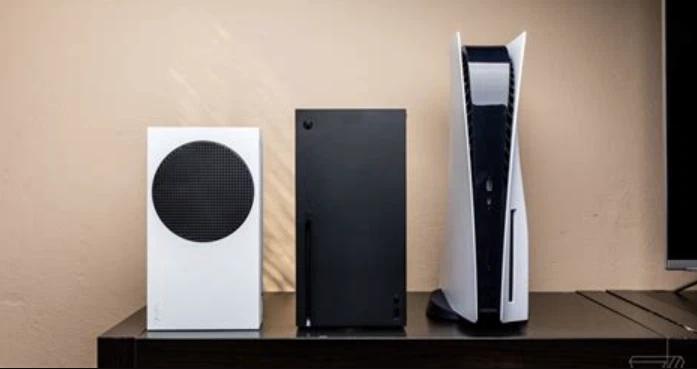
Cost Analysis: Pi Gaming vs Modern Consoles
Breaking down the real costs reveals where Raspberry Pi gaming makes financial sense and where it doesn't.
Basic Raspberry Pi 4 Gaming Setup ($99-130):
Pi 4 4GB board: $55
Official power supply: $8
32GB microSD with RetroPie: $12
Basic case: $10
Two USB controllers: $24-30
HDMI cable: $6
Total: $115-121
Premium Raspberry Pi 5 Gaming Setup ($180-220):
Pi 5 8GB board: $80
27W official power supply: $12
128GB high-speed microSD: $25
Active cooler case: $25
Two 8BitDo controllers: $50
2x micro-HDMI cables: $14
USB card reader: $8
Total: $214
Modern Console Baseline:
PS5 Digital: $449
Xbox Series S: $299
Xbox Series X / PS5 Disc: $499
The upfront hardware cost favors Pi setups by $179-380. But that's only part of the equation. Modern consoles benefit from economies of scale that Pi hardware can't match. Sony and Microsoft sell consoles at break-even or slight losses, profiting from game sales and subscriptions. A Pi kit from CanaKit or Vilros includes retailer markup, making the value proposition different.
Long-term costs shift the calculation. Game acquisition matters: Pi gaming requires ROMs (legally obtained from games you own), while console gaming involves $60-70 purchases or subscription services. Xbox Game Pass Ultimate runs $16.99/month ($204/year), PlayStation Plus Extra costs $134.99/year. Over three years, subscription costs alone exceed the price difference between a Pi 5 kit and an Xbox Series S.
Energy consumption tells another story. The Pi 5 peaks at 12W under full load during gaming-typically running at 6-8W for retro emulation. A PS5 draws 100-200W depending on the game, Xbox Series X pulls 150-220W. Running four hours daily over a year, a Pi costs roughly $7 in electricity (at $0.13/kWh national average) versus $85-115 for modern consoles. That's $78-108 annual savings, or $234-324 over three years.
Performance Realities: Where Pi Gaming Breaks Down
The Raspberry Pi forums and Reddit communities document consistent pain points that marketing materials gloss over.
Frame rates become problematic with demanding N64 and PSP games. Titles like GoldenEye 007 and Gran Turismo PSP hit 30fps with occasional dips on Pi 5, compared to smooth 60fps (or 30fps stable on original hardware). Dolphin emulator for GameCube manages Mario Kart: Double Dash at playable speeds but struggles with Soul Calibur II. PS2 emulation remains experimental-God of War is unplayable, while simpler games like Katamari Damacy manage 20-25fps with visual artifacts.
Audio lag presents another issue. Bluetooth controller latency combined with emulation overhead creates 50-100ms input delay on some systems. Wired USB controllers reduce this to 30-50ms, still noticeable in timing-sensitive games like rhythm titles or fighting games. Modern consoles maintain 10-20ms controller latency as a baseline.
Storage limitations constrain library size. A 64GB microSD card holds roughly 40-50 PS1 games or 8-12 GameCube ISOs. Modern games range from 50GB (smaller titles) to 150GB+ (Call of Duty, GTA V). Even with USB SSD expansion, a Pi-based system managing 500GB costs more than the SD card solution and still falls short of the 1TB standard in current consoles.
Configuration complexity deters casual users. RetroPie requires manual BIOS file placement, controller mapping per emulator, and performance tweaking. One Reddit user documented 4.5 hours getting PlayStation 2 emulation "barely working" on Pi 5. Modern consoles work out of the box-pop in a disc or download, and play.
The software ecosystem creates real limitations. Steam, Epic Games Store, PlayStation Network, Xbox Live-none function on ARM-based Pi hardware. Box86/Box64 emulation layers allow some x86 Linux games to run, but compatibility is spotty and performance suffers. Native Pi games exist (Minecraft Pi Edition, numerous indie titles), but the library is microscopic compared to console offerings.
The Real Use Cases for Pi Gaming Kits
Raspberry Pi gaming thrives in specific scenarios where modern consoles struggle or overshoot.
Retro Gaming Collections: A Pi 5 running RetroPie holds 5,000+ games from NES, SNES, Genesis, Game Boy, PlayStation 1, and arcade systems. That library costs thousands in original cartridges, even at used prices. For players wanting comprehensive retro access without multiple physical consoles and cables, Pi setups deliver unmatched convenience.
Portable Gaming Projects: DIY handheld consoles using Pi Zero 2 W ($15 board) or Pi 4 create Game Boy-style devices for under $80 total. The GamePi43 kit from Waveshare or custom 3D-printed shells with 3.5-inch screens offer portable SNES/Genesis/GBA gaming that commercial handhelds can't match at the price point.
Educational Projects: Teaching kids programming through game modification works better on open Pi systems than locked-down consoles. The learning curve for editing RetroPie configurations, adding custom themes, or programming simple Python games provides hands-on computing education. Many schools use Pi-based gaming setups as STEM teaching tools.
Multi-Purpose Computing: A Pi 5 serves as a retro gaming console, media server running Plex/Jellyfin, home automation hub, and lightweight desktop PC. Switching between these functions requires swapping microSD cards or dual-booting. Modern consoles lock into their gaming/media ecosystem without repurposing options.
Arcade Cabinet Builds: Full-size arcade cabinets using Pi boards cost $300-600 in materials versus $1,500-3,000 for commercial units. The Pi drives dual joysticks, 8+ buttons per player, and a 27-inch monitor while playing 2,000+ MAME arcade games. No modern console supports this control layout without expensive adapters.
Real projects demonstrate Pi gaming's sweet spot. A Reddit user built a working Ms. Pac-Man cabinet replica using Pi 4, spent $425 total, and hosts local multiplayer tournaments. Another converted a broken NES console shell into a Pi 3-powered system that looks authentic on the shelf while playing 400+ NES titles. These creative applications-impossible with modern consoles-justify the technical hurdles.

When Modern Consoles Remain Essential
Certain gaming needs bypass Raspberry Pi entirely, regardless of configuration or budget.
Current-Generation Games: Any title from 2014 onward likely won't run. Red Dead Redemption 2, Elden Ring, Spider-Man, Halo Infinite, God of War Ragnarök-these require dedicated gaming hardware. The ARM architecture and limited GPU power create fundamental barriers no software optimization can overcome.
Online Multiplayer: Xbox Live and PlayStation Network offer matchmaking, voice chat, and community features Pi systems can't replicate. Retro game netplay exists through RetroArch, but it's limited to small friend groups with manual setup, not the seamless experience consoles provide.
4K HDR Gaming: The Pi 5 outputs 4K video but struggles to emulate games at that resolution. Even 1080p emulation taxes the system on demanding titles. Modern consoles deliver native 4K in many games, with upscaling technologies (DLSS, FSR) pushing performance further.
Official Game Libraries: Backward compatibility on Xbox Series X|S covers four console generations officially. PlayStation Plus Premium provides legal access to hundreds of PS1-PS5 titles. Pi emulation requires self-sourced ROMs, creating legal gray areas that official services avoid.
Plug-and-Play Experience: Modern consoles update automatically, manage storage transparently, and troubleshoot problems through guided menus. Pi gaming demands technical comfort-terminal commands, file system navigation, and community forum troubleshooting. That's fine for enthusiasts, frustrating for casual players.
Latest Hardware Features: Ray tracing, adaptive triggers, haptic feedback, spatial audio-these modern gaming features don't exist in retro emulation. The DualSense controller's advanced features remain inaccessible even when plugged into a Pi running RetroPie.
The target audience splits clearly. Pi gaming suits technical hobbyists, retro enthusiasts, budget-conscious collectors, and experimenters building custom systems. Modern consoles serve players wanting cutting-edge graphics, new releases, effortless online play, and manufacturer support.
Technical Specifications Comparison
Putting hardware side-by-side reveals the performance gap:
Raspberry Pi 5 (flagship model):
CPU: 2.4GHz quad-core ARM Cortex-A76
GPU: VideoCore VII 800MHz (~0.1 teraflops)
RAM: 4GB or 8GB LPDDR4X
Storage: microSD or external USB
Power: 5V 5A (25W max, 6-12W typical)
Price: $60 (4GB) / $80 (8GB) board only
PlayStation 5:
CPU: 8-core AMD Zen 2 @ 3.5GHz
GPU: AMD RDNA 2, 10.28 teraflops
RAM: 16GB GDDR6
Storage: 825GB custom NVMe SSD
Power: 350W max (100-200W typical)
Price: $499
Xbox Series X:
CPU: 8-core AMD Zen 2 @ 3.8GHz
GPU: AMD RDNA 2, 12 teraflops
RAM: 16GB GDDR6
Storage: 1TB custom NVMe SSD
Power: 315W max (150-220W typical)
Price: $499
The GPU difference matters most. That 100x teraflop gap explains why Pi systems cap out at early 2000s console emulation. Modern game engines expect dedicated graphics hardware with ray tracing cores, texture compression units, and memory bandwidth Pi boards lack.
RAM and storage also constrain performance. Game textures, assets, and code for modern titles exceed the Pi's 8GB maximum. Load times from microSD cards (even UHS-II speeds around 300 MB/s) pale compared to custom NVMe SSDs in PS5/Xbox hitting 4,800-7,300 MB/s.
Setup Complexity: What Getting Started Really Requires
Building a functional Pi gaming system involves more steps than reviews often admit.
Hardware Assembly (30-90 minutes):
Insert microSD card into reader, flash RetroPie image using Raspberry Pi Imager
Insert microSD into Pi board
Install heatsinks or active cooler on processor
Mount board in case, connect cooling fan
Connect power, HDMI, USB controllers
Boot system, complete initial configuration wizard
Software Configuration (1-3 hours first time):
Connect to WiFi through RetroPie menu
Update RetroPie-Setup script, install emulator packages
Configure each emulator's settings (resolution, shaders, controls)
Map controller buttons per emulator (some require manual config file edits)
Transfer game ROMs via USB, network share, or SFTP
Scrape game metadata (box art, descriptions) from online databases
Test games, adjust emulator settings for optimal performance
Configure save states and auto-save functionality
Ongoing Maintenance:
Regular RetroPie updates every 2-3 months
BIOS file updates when emulators improve
Controller remapping after system updates occasionally reset configs
Performance tuning for newly added demanding games
Storage management as library grows
By comparison, modern console setup:
Connect power and HDMI (5 minutes)
Connect to WiFi, sign into account (10 minutes)
Download and install system update (15-30 minutes)
Insert disc or download game, play
The 10-15 hour learning curve for Pi gaming pays off for technical users. Casual gamers accustomed to console simplicity find Pi systems frustrating. Community forums help, but troubleshooting "why won't my N64 game load" requires comfort with Linux terminal commands and config file syntax.
Making the Decision: Pi Gaming vs Console
The replacement question has a nuanced answer depending on your gaming profile.
Pi Gaming Makes Sense If You:
Primarily play pre-2005 games
Enjoy tinkering with hardware and software
Want a multi-purpose device (gaming, media server, home automation)
Have technical troubleshooting skills
Prefer one-time purchase over subscriptions
Need portable or custom form factors
Value energy efficiency
Want to learn computing fundamentals
Modern Consoles Are Better If You:
Play current-generation games
Prefer plug-and-play simplicity
Want manufacturer support and warranties
Need robust online multiplayer
Value latest graphics and features
Don't want configuration hassles
Have budget for $60-70 games or subscriptions
Want 4K HDR gaming experiences
The Hybrid Approach: Many enthusiasts maintain both. A Pi handles retro gaming collections while PS5/Xbox covers new releases. Total investment runs $650-850 but provides access to 40+ years of gaming from Atari 2600 through current generation.
The Pi 5's improved performance makes it the strongest candidate yet for partial console replacement. It handles everything through early Xbox/PS2 generation-roughly 1977-2002 gaming history. For titles in that era, Pi kits match or exceed original hardware. Past that boundary, dedicated gaming hardware becomes necessary.
Future Prospects: Pi 6 and Beyond
The Raspberry Pi Foundation maintains a 2-year major release cycle. Pi 6, expected in 2025-2026, will likely include:
3-4GHz ARM Cortex-A78 or newer cores
Improved GPU with Vulkan support
16GB RAM standard option
PCIe 3.0 or 4.0 interface
Better thermal management
These improvements might push PS2 and GameCube emulation into "flawless" territory, with Xbox 360 and PS3 reaching "playable" status. However, the ARM architecture limitation persists-native Windows games and modern console exclusives remain inaccessible.
The emulation community's progress matters as much as hardware. RetroArch developers optimize cores continuously, PCSX2 (PS2 emulator) improves monthly, and Dolphin (GameCube/Wii) refines performance. Software optimization on existing Pi 5 hardware may unlock better compatibility before Pi 6 launches.
Commercial competitors like Anbernic handheld consoles, GPD micro PCs, and Steam Deck occupy the space between Pi and full consoles. These offer better plug-and-play experiences than Pi kits while maintaining some technical flexibility. Steam Deck specifically runs PC games natively, bridging the gap Pi systems can't cross.
Raspberry Pi gaming kits fill a specific niche: affordable, versatile retro gaming with learning opportunities. They don't replace modern consoles for current-generation gaming, nor should anyone expect them to. The real question isn't "can they replace consoles" but rather "do they cover the games I want to play." For three decades of gaming history, the answer is increasingly yes. For everything from 2013 onward, the answer remains no.