





First off, let's talk about why accessories are such a game-changer for beginners. The Uno board is fantastic for learning the basics of coding and circuits, but without the right tools, you might hit roadblocks like unreliable connections or hard-to-debug issues. Accessories for Arduino Uno bridge that gap, making your setup more reliable and versatile. Think of them as the supporting cast that turns your Uno into a star performer. Whether you're a student, hobbyist, or just someone who loves DIY tech, investing in quality accessories early on saves time, money, and frustration. In 2025, with newer boards like the Arduino Uno R4 or even the Linux-capable Uno Q available, many of these accessories remain compatible, but always check pinouts for seamless integration.
Prioritizing a Multimeter: Your Go-To Tool for Troubleshooting
One of the most underrated accessories for Arduino Uno is a good digital multimeter. Trust me, when you're knee-deep in a circuit and things aren't working, this little device becomes your best friend. It lets you measure voltage, current, resistance, continuity, and even capacitance in some models. This is why it's so important-unstable power can cause circuits to malfunction or even get damaged – like when an LED gets too much juice and burns out. With a multimeter, you can spot those issues before they escalate.
For beginners, a great option is an auto-ranging multimeter. These devices adjust to the correct range automatically, which makes testing easier without needing to manually change settings. If you're looking for something reliable, brands like Fluke are known for their precision, but there are also budget-friendly choices that perform well, like those from Klein Tools. If you're recycling parts from old gadgets, a model that checks capacitance is a bonus – it helps verify if those capacitors are still good. In my experience, using a multimeter as one of your first accessories has prevented countless headaches. Picture this: You're building a simple sensor circuit, and the readings are off. A quick voltage check reveals a loose wire, and boom – problem solved.
To make it even more user-friendly, pair it with some alligator clips for hands-free testing. This way, you can probe your Arduino Uno setup without juggling tools. Remember, safety first – always disconnect power before measuring resistance to avoid shorts. A digital multimeter is one of the most essential tools for any beginner. It helps you troubleshoot your circuits by measuring voltage, current, and resistance accurately. It's one of the first tools I'd recommend adding to your setup. From our manufacturing standpoint, we've seen how regular voltage checks during assembly prevent defects, so start every project with a baseline measurement to ensure stability.
Breadboards and Jumper Wires: The Building Blocks of Prototyping

No discussion of accessories for Arduino Uno would be complete without breadboards and jumper wires. These are the foundations that let you experiment without committing to permanent solder joints. A breadboard is basically a grid of holes connected internally, allowing you to plug in components and wires quickly. Start with at least a couple – maybe a full-size one for bigger projects and a half-size for quick tests. This setup lets you isolate parts of your circuit, making debugging a breeze.
Jumper wires are the connectors that bring it all together. Go for a mix: solid-core wires for sturdy, reliable links on the breadboard, and flexible Dupont wires for jumping to the Uno board itself. Color-coding is key – red for positive power, black for ground, blue for signals – it keeps things organized and reduces mix-ups. I've seen prototypes turn into a rat's nest without this, leading to crossed wires and mysterious failures.
As a reliable supplier of Arduino Uno accessories, Kuongshun provides high-quality and absolutely safe accessories and kits. Our Dupont wires connect securely, so you won't face intermittent connection issues. As you build more complex projects, like a traffic light simulator, these accessories for Arduino Uno become indispensable. Tip for newbies: Label your breadboards with masking tape for different project sections – it saves time when swapping ideas. In production testing, we always recommend organizing wires by function to speed up iterations and reduce errors.
Expanding on this, consider adding proto-shields as advanced accessories. These snap onto the Uno and provide a solderable area for permanent circuits while keeping the breadboard flexibility. It's a step up once you're comfortable with basics. For compatibility with 2025 models like the Uno R4, ensure the shield matches the pin layout to avoid rework.
Mastering Soldering: From Prototype to Permanent Build

Once your breadboard prototype is humming along, soldering is the next logical step among accessories for Arduino Uno. It's what turns temporary setups into durable gadgets. An adjustable soldering iron is a must – something with temperature control to handle delicate components without melting them. Add in a helping hands tool (those alligator clip stands) and some flux for clean joints.
Practice makes perfect here. Start on scrap PCBs or perfboards to get the hang of it. Avoid common pitfalls like cold joints – those lumpy, dull connections that fail over time. Heat the pad and wire, not just the solder, for a strong bond. Safety gear like glasses and a fume extractor are non-negotiable accessories soldering sessions; you don't want to inhale those vapors.
Soldering is a critical skill for anyone moving from prototypes to permanent builds. Once you're comfortable with the basics, you can start making your own custom shields or enclosures. For example, soldering a sensor array onto a perfboard that directly connects to your Arduino Uno ensures a solid, reliable connection for your projects. For Arduino enthusiasts, soldering opens doors to custom shields or enclosures. Imagine soldering a sensor array onto a perfboard that plugs right into your Uno – that's reliability you can count on. Kuongshun has great soldering kits that pair well with other accessories, ensuring everything integrates smoothly. Based on our tech team's experience, applying flux generously and maintaining iron tips clean leads to stronger bonds that withstand vibrations in real-world applications.
Power Supplies: Keeping Your Projects Stable and Safe
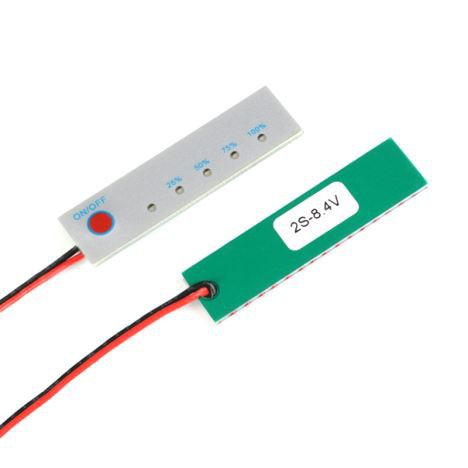
Power can make or break your setup, so dedicated power supplies are vital accessories for Arduino Uno. The Uno's onboard regulator handles light loads, but add motors or bright LEDs, and it might overheat or reset unexpectedly. A breadboard power module is a simple fix – it plugs in and provides stable 5V and 3.3V rails.
For bigger projects, an adjustable bench power supply lets you dial in exact voltages. Add decoupling capacitors (like 0.1uF ceramics) across power lines to filter noise – it's a pro tip that stabilizes sensors and prevents glitches. I've used these accessories in robot builds, where consistent power means smooth operation.
Don't skimp on quality; cheap supplies can introduce ripple that messes with analog readings. Look for ones with overcurrent protection to safeguard your Uno. These overcurrent protection power supplies not only protect your board but also teach you about efficient circuit design. In our manufacturing process, we stress-test power modules under load to ensure they handle peaks without dropout, so opt for rated units that exceed your project's needs.
Sensors: Bringing the Real World into Your Projects
Sensors are exciting accessories for Arduino Uno that let your board interact with the environment. Start with a DHT22 for temperature and humidity – it's accurate and easy to code with libraries like DHT sensor. Hook it up, and you can monitor your room or even a greenhouse, logging data to the serial monitor.
PIR motion sensors are another gem. They detect movement and trigger actions like turning on lights. Just watch for false triggers from heat sources; position them thoughtfully. Ultrasonic sensors like HC-SR04 add distance measurement for obstacle avoidance in bots.
These sensors make projects interactive. For example, combine a soil moisture sensor with a relay to automate plant watering – practical and fun! Kuongshun's sensor kits (like AE002) bundle several, making them affordable additions to your accessories collection. Our engineers suggest calibrating sensors in ambient conditions first, as factory tolerances can vary slightly for precision in IoT setups.
Input Devices: Buttons, Pots, and More for User Control
Input accessories for Arduino Uno like buttons and potentiometers add interactivity. Pushbuttons teach debouncing – that software trick to ignore bounces from mechanical contacts. Use pull-up resistors (built-in on Uno pins) to keep signals clean.
Potentiometers offer analog input for things like dimming LEDs or controlling servo angles. They're cheap and versatile. Tactile switches are great for compact designs. Experiment with joysticks for game-like controls.
In projects, these accessories for Arduino Uno shine – think a custom game controller or adjustable thermostat. Common mistake: Forgetting resistors with buttons, leading to floating pins. Always ground them properly. From a production view, incorporating debounce capacitors alongside software fixes ensures reliable inputs even in noisy environments.
Outputs: LEDs, Servos, and Strips for Visuals and Motion

For output, LEDs are classic accessories for Arduino Uno. Start with a basic assortment, including RGB ones for color mixing. Resistors are crucial to limit current – 220 ohms is a safe bet.
Servos like the SG90 are perfect for motion. The Servo library makes control effortless. LED strips (WS2812B) create dazzling effects but need external power to avoid overloading the Uno.
These outputs turn ideas into reality, like a servo-arm robot or holiday lights display. Power them separately and use logic level shifters if needed. Tech tip: When scaling LED strips, calculate total current draw upfront-our kits include guidelines to prevent overloads in multi-strip designs.
Displays: See Your Data in Action

Displays are transformative accessories for Arduino Uno. A 16x2 LCD with I2C uses just two wires, showing data without a PC. Libraries like LiquidCrystal_I2C simplify setup.
OLEDs offer crisp graphics for menus or charts. They're compact and low-power. Use them for portable projects like a weather station.
Untether your Uno with these – no more serial monitor dependency. Kuongshun has affordable options that integrate seamlessly with other accessories for Arduino Uno. In assembly, we prioritize I2C interfaces for minimal wiring, reducing failure points in compact builds.
Wireless and Connectivity: Go Beyond Wires
ESP8266 or ESP32 modules add WiFi as accessories for Arduino Uno, enabling IoT projects like remote sensors. Use level shifters for voltage compatibility.
Bluetooth HC-05 pairs with apps for control. These expand your reach – think smart locks or data loggers. For newer Uno variants in 2025, ESP32's dual-core processing pairs well, but verify power requirements to maintain stability.
Data Logging: Store and Analyze
SD card modules are key accessories for Arduino Uno for standalone operation. Format cards FAT32 and use the SD library for files.
Log sensor data for analysis later – great for environmental monitoring. Our testing shows FAT32 reliability for long-term logs, but add error-checking code to handle card failures gracefully.
Organization and Safety: The Unsung Heroes
Bins, anti-static mats, and glasses keep things safe and tidy. These accessories for Arduino Uno prevent losses and accidents. Prioritize ESD protection in humid climates to safeguard sensitive components.
In wrapping up, diving into accessories for Arduino Uno is the best way to level up your electronics game. From troubleshooting with a multimeter to wireless wonders, these tools make learning engaging. Start small, experiment, and watch your projects evolve. Happy making!
Recommended Starter Kit: Your All-in-One Launchpad
For a budget-friendly start, assemble a kit with core accessories for Arduino Uno. Include the Uno board (like Kuongshun's AA002), breadboards, wires, multimeter, servo, DHT sensor, LCD, LEDs, and buttons.
Criteria: Removable chip on Uno for easy fixes, auto-ranging multimeter, color-coded resistors.
These accessories for Arduino Uno in a kit build skills iteratively.
Core Kit Components (Including but Not Limited To):
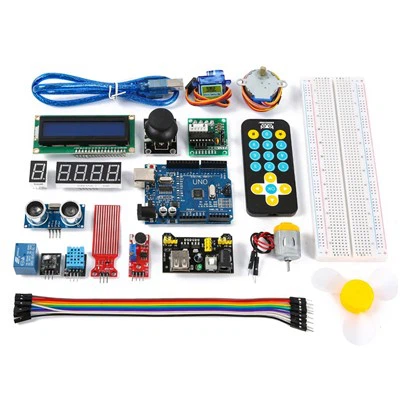
- Arduino Uno R3 board (or compatible version, such as the KUONGSHUN AA002 Development Board for reliable performance and included USB cable)
- At least two breadboards (e.g., one full-size and one half-size for modular testing; check kuongshun-ks.com for durable options)
- Jumper wires (one set of flexible Dupont wires and one set of solid-core wires for stability, available from Kuongshun with secure connections)
- Digital multimeter
- SG90 servo motor
- DHT11 or DHT22 temperature and humidity sensor (included in Kuongshun's sensor kits like AE002 for comprehensive beginner experimentation)
- 16x2 LCD screen with I2C backpack
- LED assortment with resistor pack
- Pushbuttons or tactile switches
For an all-in-one solution, the KUONGSHUN Customizable Starter Kit (AE001) or their Sensor Kit (AE002) from kuongshun-ks.com provides a great entry point, compatible with Arduino IDE and packed with sensors, wires, and boards to kickstart projects efficiently. Note: While focused on Uno R3, these kits work with R4 basics, but confirm advanced features.
Selection Criteria to Enhance Reliability and Value:
- Main Board: Choose an Uno board featuring a removable ATmega328P chip. This design allows easy chip replacement if damaged, reducing long-term costs compared to boards with soldered chips.
- Multimeter: Prioritize models with auto-ranging functionality to simplify measurements and reduce errors for novices.
- Component Quality: Ensure the resistor pack includes a color code reference chart for quick identification. For jumper wires, verify that solid-core options are available, as they provide more secure connections in breadboards and minimize loose contacts.
By following these criteria, the kit supports practical learning while adhering to principles of cost-efficiency and ease of use. Providers like Kuongshun enhance accessibility with their range of components and kits tailored for UNO R3 enthusiasts.