

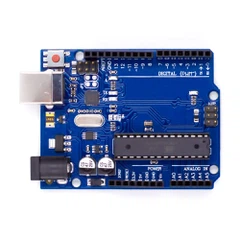
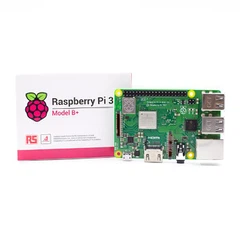


You can transform your daily tech experience with a raspberry pi. Many users choose the raspberry pi as a desktop replacement, a media center, or a hub for home automation. You can set up retro gaming consoles, create unique projects, or even manage printing tasks. The raspberry pi offers versatility and affordability, making it an excellent choice for both beginners and advanced users. Imagine using a raspberry pi to streamline your hobbies or enhance your daily routines.
Explore how a raspberry pi can fit your needs and spark your creativity.
Key Takeaways
- Raspberry Pi is a versatile tool for various projects, including home automation, media centers, and retro gaming.
- Start with simple projects to build confidence and skills. Gradually expand to more complex tasks as you learn.
- You can automate your home with smart devices using Raspberry Pi, saving time and energy while enhancing convenience.
- Raspberry Pi supports learning programming and electronics through hands-on projects, making it ideal for students and hobbyists.
- Join the Raspberry Pi community for resources, tutorials, and support to help you succeed in your projects.
Everyday Raspberry Pi Projects

Home Automation
You can transform your house into a smart home with a raspberry pi. Many users start with simple home automation projects that make daily routines more convenient and efficient. The raspberry pi acts as a central hub, allowing you to control devices, monitor your environment, and automate repetitive tasks. Here are some popular systems you can integrate with your raspberry pi:
- Smart lighting control for energy savings and ambiance
- Temperature monitoring to keep your house comfortable
- Security camera systems for peace of mind
- Smart mirror for daily updates and information
- Automated garden watering system to keep your plants healthy
You can also connect your raspberry pi to Google Assistant or Amazon Alexa, enabling voice control for your smart devices. With these tools, you can create your own home automation setup that rivals commercial solutions at a fraction of the cost. Automation not only saves you time but also reduces energy bills and increases the value of your house.
Tip: Start with one room or device, then expand your automation network as you gain confidence.
Media Center
A raspberry pi can serve as a compact, affordable media center for your living room or bedroom. You can stream movies, music, and TV shows, or organize your personal media library. Several software options are available, each with unique features:
|
Software |
Key Features |
|---|---|
|
Plex |
Media server for movies, TV shows, music; integrates online streaming; supports live TV; automatic media organization. |
|
Jellyfin |
Open-source, free all-in-one media server. |
|
OpenELEC |
Lightweight OS for HD content; designed for XBMC; minimal hardware requirements; quick installation. |
|
Raspbmc |
Minimal Linux distribution; supports 1080p playback; auto-updating; easy installation. |
|
XBian |
Fast, lightweight; low RAM and CPU usage; user-friendly configuration; open source. |
|
GeeXbox |
Full-featured OS; supports HD video decoding; HDMI-CEC; Live TV and PVR capabilities. |
While the raspberry pi offers flexibility and low power consumption, it does have hardware limitations compared to dedicated streaming devices. For example, the Amazon Fire TV provides faster performance, dual-band Wi-Fi, and a remote control, making it superior for HD streaming. However, the raspberry pi consumes less power and costs less than most commercial alternatives. If you want a customizable, budget-friendly media center, the raspberry pi remains a strong choice.
Desktop Replacement
You can use a raspberry pi as a basic desktop replacement for everyday tasks like web browsing, document editing, and email. This approach works well for students, hobbyists, or anyone seeking a low-cost computing solution. Here is a comparison of the raspberry pi and a traditional PC:
|
Limitation Type |
Raspberry Pi |
Traditional PC |
|---|---|---|
|
Port Limitations |
Fewer connectors, no mic input |
More connectors available |
|
Upgradeability |
Limited hardware upgrades |
Full hardware upgrade options |
|
Different Architectures |
Non-Intel/AMD processor, limited apps |
Standard Intel/AMD architecture |
|
Cost |
Low cost (< $100) |
Generally higher cost |
Although the raspberry pi cannot match the performance or expandability of a full PC, it offers a practical solution for lightweight tasks. You can set up a complete desktop environment with the best raspberry pi accessories, such as a keyboard, mouse, and monitor. This setup can save money and reduce energy consumption, especially for secondary workstations or educational purposes.
Printing Tasks
A raspberry pi can manage both networked and USB printers in your home or small office. This project allows you to share a single printer with multiple devices, including Windows, macOS, and mobile platforms. To set up printer sharing, follow these steps:
- Install CUPS (Common Unix Printing System) using sudo apt-get install cups to manage printers and print jobs.
- Configure CUPS for remote access by editing the configuration file with sudo nano /etc/cups/cupsd.conf.
- Set up printer sharing with Samba using sudo apt-get install samba for compatibility with Windows and SMB devices.
- Enable Avahi for printer discovery on macOS and iOS devices with sudo apt-get install avahi-daemon.
You can complete these steps with minimal technical knowledge, making this one of the most accessible raspberry pi projects. By centralizing printing tasks, you streamline your workflow and reduce the need for multiple printers in your home or office.
Note: Always check compatibility between your printer model and the raspberry pi before starting your project.
Everyday raspberry pi projects help you simplify daily routines, save money, and make your house smarter. Whether you want to automate your home, enjoy digital entertainment, replace a desktop, or manage printing, the raspberry pi provides a flexible and affordable platform. With the right accessories and a bit of creativity, you can unlock the full potential of this powerful device.
Learning with Raspberry Pi

Programming
You can use a Raspberry Pi to learn to code in a hands-on way. Many schools and coding clubs choose this device because it supports both text-based and visual programming languages. The most common languages for beginners include Python and Scratch. Python offers a simple syntax, making it ideal for those new to programming. Scratch uses a drag-and-drop interface, which helps you understand coding logic without typing complex commands.
|
Language |
Description |
|---|---|
|
Python |
The default and most widely used language for Raspberry Pi programming, ideal for beginners. |
|
Scratch |
A visual programming language designed for kids and beginners, allowing interactive coding through drag and drop. |
You can start with beginner-friendly projects that build your confidence and skills. Some popular options include:
- Monitor your Raspberry Pi's NUT server with PeaNUT.
- Synchronize your Joplin notes by running the Joplin server.
- Set up a retro gaming machine with Batocera.
- Display your Google Calendar on a screen.
- Program an Arduino directly from your Pi using the Arduino IDE.
These projects help you learn to code while solving real problems or creating fun experiences.
Electronics
Raspberry Pi gives you the chance to explore electronics and physical computing. You can connect sensors and actuators directly to the device. This setup lets you measure temperature, detect motion, or control lights and motors. Many students use Raspberry Pi to build Internet of Things (IoT) projects, which combine hardware and software skills. You can use Python or Scratch to write code that interacts with electronic components. This approach makes electronics accessible, even if you have no prior experience.
- Control and interact with sensors and actuators.
- Explore IoT concepts with simple hardware setups.
- Use beginner-friendly programming languages for hands-on learning.
You gain practical skills that apply to both hobby projects and future careers in technology.
Educational Tools
Raspberry Pi supports a wide range of educational tools and platforms. In classrooms, you can use it to assemble basic computers, build robots, or set up weather stations. These activities teach you about hardware, coding, and teamwork. The following table highlights some popular classroom projects:
|
Project Type |
Description |
|---|---|
|
Basic Computer Assembly |
Students learn to build a computer using a Raspberry Pi, introducing them to programming and hardware assembly. |
|
Robotics Projects |
Engages students in coding and physical computing by building robots that perform tasks. |
|
Weather Station |
Students assemble sensors to measure environmental data, applying STEM concepts in real-time. |
|
Mini Server Setup |
Teaches students to create a file-sharing network, promoting collaboration and resource-sharing. |
Recent studies show mixed results for Raspberry Pi in improving STEM learning outcomes. While some students do not show significant changes in their attitudes toward computer science, many enjoy the hands-on approach and give positive feedback. You benefit most when you combine Raspberry Pi with other teaching methods or use it over a longer period.
Tip: Start with simple projects and build your skills step by step. Raspberry Pi makes learning to code and exploring electronics both fun and practical.
Creative Projects

The raspberry pi opens the door to a world of creative projects. You can use this compact device to build, play, and experiment in ways that traditional computers cannot match. These projects encourage you to explore new hobbies, develop technical skills, and share your creations with others.
Retro Gaming
You can turn your raspberry pi into a retro gaming console. This project lets you relive classic games from consoles like NES, SNES, and PlayStation. The most popular emulators for raspberry pi include:
- RetroPie
- Recalbox
- Lakka
- Batocera
RetroPie stands out for its user-friendly interface and broad compatibility. You can set up your system with EmulationStation and RetroArch, making it easy to manage your game library. When you compare the gaming performance of raspberry pi models to original consoles, you see clear advantages:
|
Device |
Performance Level |
|---|---|
|
Raspberry Pi 4 |
Better emulation for Dreamcast, N64, PSP |
|
Raspberry Pi 3 B+ |
Suitable for PS1 and many N64, PSP games |
|
Original Consoles |
Limited by hardware capabilities |
You gain access to thousands of games and can customize your setup to fit your preferences.
Minecraft Server
You can host your own Minecraft server using a raspberry pi. This project allows you to play with friends and control your gaming environment. For the best experience, use a raspberry pi 4 or newer model. The technical requirements include:
- Raspberry pi board (8 GB RAM recommended)
- MicroSD card (32GB or more)
- Raspberry Pi OS (32-bit or 64-bit)
- Ethernet connection for stability
This setup gives you a private, low-cost server that supports mods and custom worlds.
Stop-Motion Camera
You can create a stop-motion camera with a raspberry pi. This project helps you produce animated videos by capturing individual frames. A typical hardware setup includes:
|
Component |
Description |
|---|---|
|
Raspberry Pi 4 |
The main processing unit for the camera |
|
Breadboard |
Connects electronic components |
|
Jumper wires |
Links components together |
|
Button |
Triggers image capture |
You can experiment with different scenes and bring your stories to life frame by frame.
Time-Lapse Videos
You can use a raspberry pi to make time-lapse videos. This project involves taking photos at set intervals and combining them into a video. You can document plant growth, weather changes, or construction progress. The raspberry pi's flexibility allows you to adjust settings and automate the process.
FM Radio Broadcasting
You can turn your raspberry pi into a mini FM radio station. This project lets you broadcast music or messages over short distances. You only need a simple wire as an antenna and some open-source software. This setup provides a hands-on introduction to radio technology and broadcasting.
Creative projects with raspberry pi inspire you to learn, experiment, and share your results. You can find a project that matches your interests and skill level, making technology both fun and accessible.
Advanced Raspberry Pi Uses
If you want to push your skills further, you can explore advanced raspberry pi uses. These projects often require deeper technical knowledge and offer powerful solutions for network security, IoT, and custom hardware integration. You will find these applications especially appealing if you enjoy solving complex problems or want to match professional or commercial solutions at a fraction of the cost.
Network Security
You can turn your raspberry pi into a robust network security tool. Many advanced users deploy the device to monitor, protect, and manage their home networks. Here are some of the most common applications:
|
Application |
Description |
|---|---|
|
Pi-hole |
Efficient ad and tracker blocking at the DNS level. |
|
WireGuard |
Provides VPN services for encrypted access to the home network. |
|
Nmap |
Used for periodic scans of the local network. |
Pi-hole stands out for blocking ads and trackers across all devices in your home. WireGuard lets you set up a secure VPN server, giving you encrypted access to your network from anywhere. Nmap helps you scan your network for vulnerabilities, similar to tools used by IT professionals. Compared to commercial security appliances, raspberry pi projects offer flexibility and lower costs, though you may need to invest more time in setup and maintenance.
Tip: Always keep your raspberry pi updated to reduce security risks.
IoT Projects
You can use raspberry pi to power advanced IoT projects. Many smart home enthusiasts choose this device for its ability to connect sensors, control devices, and automate routines. You can build custom boards that optimize power use and support wireless protocols like Zigbee or Z-Wave. These features allow you to create a smart home system tailored to your needs.
Monitor temperature, humidity, or motion in real time.
Automate lighting, security, or energy management.
Integrate with cloud services for remote control.
Raspberry pi projects in IoT often rival commercial hubs in flexibility, but you gain more control and customization.
Custom Hardware
You can integrate raspberry pi with custom hardware for specialized tasks. Many advanced users design custom boards for prototyping, industrial automation, or education. The table below highlights common types of integration:
|
Type of Integration |
Description |
|---|---|
|
IoT Deployments |
Custom boards optimize power consumption and integrate specific wireless protocols for smart home automation. |
|
Prototyping |
Custom boards serve as testing platforms for validating concepts and refining designs before production. |
|
Industrial Automation |
Customized boards incorporate specific interfaces and robust components for precise control in harsh environments. |
|
Education and Research |
Tailored boards include built-in sensors and custom expansion capabilities for specific experiments or teaching needs. |
You can use raspberry pi to prototype new ideas before moving to mass production. In industrial settings, you can control machinery or monitor systems with precision. For education, you can create hands-on experiments that help students learn about technology.
Note: Advanced raspberry pi projects may require soldering, programming, or knowledge of electronics.
Advanced raspberry pi uses let you build solutions that match or exceed commercial products in flexibility and cost-effectiveness. If you want a challenge, these projects will help you develop valuable technical skills and expand your capabilities.
Getting Started with Projects

Choosing a Project
Selecting the right raspberry pi project sets the foundation for your success. You should consider your interests, skill level, and available resources. Many beginners start with simple raspberry pi projects to build confidence and technical skills. Use the following table to guide your decision:
|
Criteria |
Description |
|---|---|
|
Necessary Components |
Identify all parts required, not just the raspberry pi board. |
|
Reliable Power Supply |
Choose a high-quality power supply, since not all chargers work well with raspberry pi. |
|
Additional Accessories |
Plan for extras like cables and a microSD card. |
|
Versatility of Raspberry Pi |
Explore the wide range of projects possible with raspberry pi, not just a single option. |
You gain the most value by starting with a project that matches your current knowledge and available accessories. As you complete more raspberry pi projects, you can move on to advanced topics.
Accessories Needed
Most raspberry pi projects require more than the board itself. You should gather essential accessories before you begin. These items help you connect, test, and expand your raspberry pi setup:
- Jumper wires: Flexible connectors for linking components without soldering.
- Breadboards: Useful for testing circuits and making quick changes.
- Sensors: Devices like temperature, humidity, or motion sensors provide input data for your raspberry pi.
You may also need a microSD card, power supply, HDMI cable, and a keyboard or mouse, depending on your chosen project. Preparing these accessories ensures a smooth start and reduces interruptions.
Tip: Organize your workspace and label your components. This habit saves time and prevents mistakes during assembly.
Helpful Resources
You can find a wealth of information and support from the raspberry pi community. Reliable online resources help you troubleshoot issues and discover new project ideas:
- RaspberryPi.org: The official site offers articles, sample projects, and courses.
- Opensource.com: Find guides, how-to articles, and success stories.
- Instructables: Explore a variety of DIY raspberry pi projects.
- Hackaday: Discover innovative raspberry pi applications and community discussions.
These platforms provide step-by-step tutorials and active forums. You can ask questions, share your progress, and learn from others' experiences.
Starting with simple raspberry pi projects allows you to build skills and confidence. As you progress, you can tackle more complex challenges and unlock the full potential of your raspberry pi.
You have seen how raspberry pi adapts to your needs, whether you want to automate your home, learn programming, or build creative projects. This device supports users at every skill level. You can start small or dive into advanced raspberry pi applications.
Take the next step-choose a raspberry pi project that excites you and share your results with the community.
FAQ
What makes Raspberry Pi a good choice for beginners?
You can start with Raspberry Pi because it offers a simple setup, affordable price, and strong community support. Many educational resources and tutorials exist online. You gain hands-on experience with hardware and software, which helps you build foundational skills in computing and electronics.
Can Raspberry Pi handle demanding tasks like video editing or gaming?
Raspberry Pi works best for lightweight tasks. You can use it for retro gaming and basic media playback. However, it cannot match the performance of high-end PCs for video editing or modern gaming. For demanding applications, you need more powerful hardware.
Why should you use Raspberry Pi for home automation?
You gain flexibility and cost savings with Raspberry Pi in home automation. You can customize your setup, integrate various smart devices, and automate routines. Many users report energy savings and improved convenience. Open-source platforms like Home Assistant support Raspberry Pi and provide regular updates.
How secure is Raspberry Pi for network projects?
You control security on Raspberry Pi by updating software and using strong passwords. Many users deploy tools like Pi-hole and WireGuard for network protection. Regular updates and community support help you address vulnerabilities. Raspberry Pi offers a secure platform when you follow best practices.
Why do schools and educators prefer Raspberry Pi for teaching?
You benefit from Raspberry Pi's affordability, versatility, and hands-on learning approach. Many schools use it to teach programming, electronics, and problem-solving. Studies show students engage more with interactive projects. Raspberry Pi supports STEM education and prepares you for future technology careers.
Note: For more data and research, see resources at raspberrypi.org and opensources.com.