





You strengthen project reliability when you follow strong technical practices for development boards. Compatibility testing matters because it reveals issues early and helps you adapt to new hardware and software. You must use a systematic approach for every test. Each test should check hardware, software, and network settings. Testing often uncovers unexpected problems. You need to run each test with different devices to confirm compatibility. Testing also helps you plan for future development. Focus on clear test steps and repeat each test for the best results.
·Choose development boards that match your project needs to avoid costly mistakes and ensure smooth integration.
·Keep your testing environment consistent and use the right tools to get reliable and repeatable results.
·Run thorough compatibility tests on hardware, software, networks, and devices to catch issues early and improve user satisfaction.
·Use automated testing and continuous integration to speed up testing, reduce errors, and maintain high software quality.
·Follow standards and maintain good debugging, logging, and update practices to keep your development board reliable and future-proof.
Development Board Selection
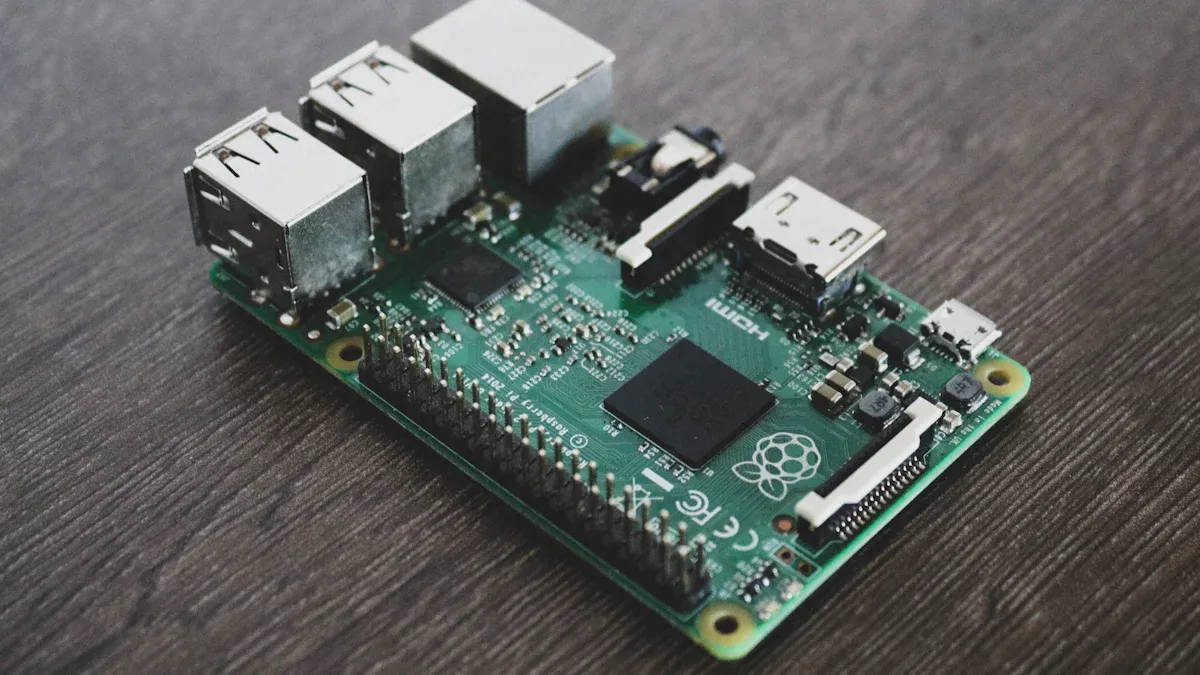
Board Criteria
You must choose the right development board to ensure smooth hardware and software integration. Start by defining your project's requirements. Consider the environment, connectivity, and any constraints. A clear set of needs helps you avoid costly mistakes during development.
Here is a table that outlines the most important criteria for selecting a development board:
|
Criterion |
Explanation |
|---|---|
|
Integration with Existing Infrastructure |
Ensures compatibility with legacy systems, proprietary software, cloud platforms, and enterprise tools to minimize deployment issues. |
|
Reliability and Durability |
Use of high-quality components and rugged design tailored to application needs to reduce failures and maintenance. |
|
Ownership and Control |
Full control over hardware roadmap, updates, and intellectual property, avoiding third-party limitations. |
|
Clear Requirements |
Defining precise use cases, environment, connectivity, and constraints to align hardware with actual needs. |
|
Appropriate Component Selection |
Choosing suitable microcontrollers, sensors, actuators, and communication modules to ensure performance and compatibility. |
|
Ease of Deployment and Maintenance |
Features like plug-and-play, remote management, and simple configuration to reduce setup complexity and ongoing support effort. |
|
Cost-Effectiveness |
Balancing initial and long-term costs including maintenance, upgrades, and energy consumption for sustainable project success. |
|
Adaptability |
Modular and customizable hardware design to support diverse use cases, protocols, and future scalability. |
|
User-Friendly Interface |
Intuitive controls and dashboards to enhance usability and user satisfaction. |
|
Thorough Testing and QA |
Extensive integration testing under various conditions to ensure hardware-software compatibility and reliability. |
|
Post-Launch Support |
Ongoing updates, bug fixes, and maintenance to improve functionality and security over time. |
You should always match your board selection to your development goals. This approach reduces risk and supports long-term project success.
Compatibility with Peripherals
You need to check compatibility between your development board and all peripherals. Voltage compatibility is critical. Most boards use either 3.3V or 5V. If you connect a 5V sensor to a 3.3V board, the sensor may not work. Connecting a 3.3V sensor to a 5V supply can cause damage. Always check the current limits for each I/O pin to prevent board failure.
When you select peripherals, follow these steps:
Evaluate available interfaces such as USB, UART, I2C, and SPI. Make sure they match your peripheral requirements.
Check the pin configuration and layout. Confirm that sensors, displays, and communication modules fit your board.
Review power supply options and voltage levels. Ensure each peripheral operates within safe limits.
Consider onboard features. Built-in sensors or displays may affect your peripheral choices.
Look at the form factor and size. The physical design of the board can limit which peripherals you can use.
Some sensor modules, like those using I2C or SPI, work across different development boards. However, expansion shields and function modules may not fit every board due to differences in pin layout and size. Always verify both the electrical and physical design before making your final selection. This careful approach ensures compatibility and smooth development.
Environment Setup
Tools
You need the right tools to build a reliable development setup. Start by selecting testing tools that match your board and project needs. Many developers use automated testing tools to speed up the process and reduce errors. These tools help you run each test quickly and repeat the same steps every time. You can use testing tools to check both hardware and software in your development board projects. Some popular testing tools include logic analyzers, oscilloscopes, and protocol analyzers. Automated testing tools also help you track changes and spot problems early in the development cycle.
A comprehensive test environment includes both physical and virtual tools. You should use virtual machines to create clean states for each test. This approach helps you avoid leftover data or settings from previous tests. Automated testing tools can connect with your workflow, making it easier to manage each test and share results with your team. When you use the right tools, you improve the quality and speed of your development process.
Consistency
You must keep your development environment consistent to get accurate and reliable testing results. Inconsistent setups often cause test failures and make it hard to find real problems. A comprehensive test environment lets you repeat each test under the same conditions. This practice helps you catch defects early and ensures your testing matches real-world use.
Maintaining consistency in your development environment ensures you can reproduce and trust your test results.
Proper management allows you to identify and fix defects quickly.
Poor environment management leads to delays, inconsistent testing, and lower software quality.
Using automated tools and clean virtual machines reduces manual errors and improves standardization.
Consistent environments support better teamwork and faster project delivery.
Common pitfalls in environment setup include hardware and software mismatches, incorrect configurations, and human errors. Environmental factors like temperature or interference can also affect your development board. You should plan ahead, follow standard procedures, and train your team to avoid these issues. When you focus on consistency, you build a strong foundation for all your testing and development work.
Compatibility Testing

Compatibility testing ensures your development board works across different hardware, software, devices, and network environments. You need to confirm that your system performs reliably, regardless of the combination of components or conditions. This process helps you find compatibility issues early, which reduces support costs and improves user satisfaction. You should always include compatibility testing in your workflow to guarantee a consistent experience for every user.
Test Types
You must understand the main types of compatibility tests to cover all possible scenarios. Each type targets a specific aspect of your development board and its environment. The following table summarizes the most common compatibility tests and what they cover:
|
Compatibility Test Type |
Aspects Covered |
|---|---|
|
Hardware Compatibility Testing |
Tests interaction with hardware components such as CPU, RAM, graphics cards, printers, scanners. |
|
Software Compatibility Testing |
Covers operating systems, libraries, drivers, software versions, and integration with other software. |
|
Network Compatibility Testing |
Checks network protocols, bandwidth, speeds, latency, security, and different network environments. |
|
Browser Compatibility Testing |
Ensures correct display and function across various web browsers and their versions. |
|
Device Compatibility Testing |
Tests product performance on different devices like smartphones, tablets, laptops, considering device characteristics (screen size, resolution, input methods). |
|
Platform Compatibility Testing |
Covers different platforms such as desktop, mobile, web, cloud, ensuring adaptation to platform features and capabilities. |
You should run hardware compatibility testing to verify your board works with different CPUs, memory sizes, and peripherals. Software compatibility testing checks your application on various operating systems and software versions. Device compatibility testing ensures your solution runs smoothly on smartphones, tablets, and laptops. Network compatibility testing helps you understand how your board performs under different network conditions, such as Wi-Fi, 4G, or low bandwidth.
Tip: Always prioritize compatibility tests for the most critical features and high-risk scenarios. This approach helps you optimize your testing efforts and catch major compatibility issues early.
You also need to include user acceptance testing. This step confirms that your development board meets user expectations in real-world conditions. User acceptance testing often reveals compatibility issues that do not appear in controlled environments. You should repeat user acceptance testing after every major update to maintain reliability.
Automated Testing
Automated testing tools play a key role in compatibility testing. You can use automated testing to run repetitive compatibility tests quickly and accurately. Tools like LambdaTest and BrowserStack provide cloud-based platforms for compatibility testing. These automated testing tools give you access to thousands of real and virtual devices, browsers, and operating systems. You can simulate real-world conditions, run tests on different configurations, and capture screenshots or videos for analysis.
Automated testing tools help you identify compatibility issues efficiently. You can integrate these tools with your CI/CD pipeline, which allows you to automate compatibility testing as part of your development process. Test automation reduces manual errors and speeds up the feedback loop. You can also use automated testing to retest after every change, ensuring that new updates do not introduce compatibility issues.
Use automated testing to:
Run compatibility tests across multiple devices and platforms.
Simulate different network environments and operating systems.
Capture and report compatibility issues with detailed logs and screenshots.
Integrate with bug tracking and project management tools for streamlined workflows.
Test automation also supports user acceptance testing by allowing you to simulate user interactions on various devices. Automated testing ensures you maintain high coverage and consistency in your compatibility testing strategy.
Forward Compatibility
Forward compatibility testing prepares your development board for future changes in hardware and software. You need to make sure your system works not only with current devices and platforms but also with upcoming versions. Forward compatibility testing helps you adapt to evolving requirements and reduces the risk of major rework when new systems are released.
Forward compatibility testing ensures:
Your software continues to function with future hardware and software updates.
You design your system with flexibility and industry standards in mind.
You reduce the risk of compatibility issues when new devices or operating systems appear.
Your development board remains accessible and reliable as technology evolves.
You should test your development board with beta versions of operating systems and new hardware releases. This practice helps you identify compatibility issues before they affect your users. You also need to verify SDK and device version compatibility. You can do this by reading device registers through debug tools or on-board software. Always run functional, performance, and security tests across different SDK and device versions. Automate these tests and integrate them into your CI/CD pipeline for continuous compatibility testing.
User acceptance testing remains important for forward compatibility. You should involve users in testing new features and updates on future platforms. This approach helps you catch compatibility issues that automated testing might miss.
Note: Regular compatibility testing, including forward compatibility, helps you future-proof your development board and maintain a high level of user satisfaction.
Effective Compatibility Testing Practices
Early Issue Detection
You improve project outcomes when you detect compatibility issues early. Early detection helps you avoid costly fixes and delays later in the development process. You need to use a range of strategies to catch problems before they reach your users.
1. Build a comprehensive test environment. Cover a wide range of devices, operating systems, and browsers that match your target audience. 2. Integrate compatibility testing into every phase of development. Run tests during unit, integration, and system testing to catch issues as soon as possible. 3. Use automated testing tools like Selenium, BrowserStack, and Sauce Labs. These tools help you run compatibility testing across many platforms and generate detailed reports. 4. Keep your test environment up to date. Regularly update operating systems, browsers, and software components to spot new compatibility issues caused by updates. 5. Simulate real-world scenarios and user behavior. Test under different network conditions and input methods to uncover problems that controlled environments might miss.
You should also test on real devices, not just emulators. Real devices show you how your development board performs in actual use. Focus your testing on the most common user configurations first. This approach helps you find critical compatibility issues that affect the most users. Encourage your team to share findings early and work together to resolve problems quickly. Regular updates to your test environment keep your compatibility testing relevant and effective.
Tip: Early and frequent compatibility testing reduces risk and builds confidence in your development process.
Continuous Integration
Continuous integration (CI) supports effective compatibility testing by automating the process and making it part of your daily workflow. You connect your development boards and embedded hardware directly to the CI test grid. Every code commit triggers automated tests, including compatibility testing, on real hardware and emulated environments. This setup gives you full traceability and access to logs for every test.
CI builds your project across multiple platforms, such as x86, ARM32, ARM64, RISC-V, and PowerPC.
You validate native boot and operation on development boards, ensuring compatibility in real-world conditions.
The CI pipeline includes unit, load, and performance testing, which helps you maintain software quality assurance.
You can bring your own hardware into the CI grid, allowing you to tailor compatibility testing to your specific needs.
Continuous integration improves transparency and collaboration. You see build status and test results from the start of the project. Automated compatibility testing runs on every commit, so you catch compatibility issues before they become major problems. This approach encourages cleaner code and faster resolution of issues. You ensure comprehensive compatibility testing coverage by validating every change across different environments.
Note: Integrating compatibility testing into CI accelerates issue detection and supports high software quality assurance.
Standards and Guidelines
You achieve reliable and repeatable results when you follow recognized standards and guidelines for compatibility testing. International standards provide frameworks and best practices that help you manage quality and reliability throughout the development life cycle. These standards guide you in defining requirements, managing processes, and maintaining software after deployment.
|
Standard |
Focus Area |
Relevance to Compatibility Testing |
|---|---|---|
|
ISO/IEC/IEEE 14764 |
Software maintenance |
Supports ongoing quality and reliability after initial compatibility testing. |
|
ISO/IEC 15026-2:2011 |
Assurance case structure |
Helps you demonstrate reliability and maintainability in compatibility testing. |
|
IEEE/ISO/IEC 15288-2023 |
System life cycle processes |
Ensures quality and stakeholder involvement throughout development, critical for compatibility testing. |
|
ISO/IEC/IEEE 15026 series |
Systems and software assurance |
Supports systematic assurance during compatibility testing. |
|
ISO/IEC/IEEE 29148-2011 |
Requirements engineering |
Ensures compatibility requirements are well-defined and managed. |
|
ISO/IEC/IEEE 90003 |
Software engineering quality management guidance |
Supports quality assurance in software aspects of development boards. |
|
ISO/IEC/IEEE 12207 |
Software life cycle processes |
Supports quality and reliability in software development and maintenance. |
|
ISO/IEC TR 24774 |
Process description guidelines |
Supports clear and effective process management in compatibility testing. |
|
IEEE Guide--Adoption of ISO/IEC 90003:2004 |
Quality management in software development |
Enhances quality assurance in software components of development boards. |
You should use these standards to guide your compatibility testing practices. They help you define clear requirements, manage your testing processes, and maintain high quality after deployment. Following these guidelines ensures your development board meets industry expectations for reliability and compatibility.
Callout: Adopting international standards in your compatibility testing practices builds trust with users and stakeholders.
Troubleshooting and Maintenance
Debugging
You need strong debugging skills to keep your development board running smoothly. When you face compatibility issues, break down the problem into smaller parts. This divide-and-conquer approach helps you isolate the root cause. Use debugging tools like JTAG debuggers or emulators to step through your code and inspect variables. Set breakpoints and watchpoints to pause execution and check variable changes during a test. Logic analyzers and oscilloscopes help you analyze signals and timing issues. Always check error codes and system logs to understand failures. Keep your firmware updated to fix known bugs and improve compatibility. Collaborate with other developers and online communities for extra support. You can learn a lot from real-world cases, such as motor control systems or sensor interfaces, to improve your troubleshooting process.
Tip: Follow a systematic debugging process-identify the issue, set breakpoints, inspect execution, use logging, and apply your tools iteratively.
Logging
Effective logging makes troubleshooting much easier. You should implement comprehensive logging in your firmware to capture runtime information. Use structured logs that include context, such as user IDs, session info, and error codes. This approach helps you trace problems quickly and accurately during a test. Tools like IAR Tracealyzer can profile your code and highlight performance bottlenecks. Consistent log formatting and metadata, such as deployment versions, help you connect issues to specific releases. Logging also supports system monitoring and performance analysis, which are vital for reliability in complex environments. Share logs with your team to foster better collaboration and faster problem-solving.
Benefits of strong logging:
Faster error identification
Easier root cause analysis
Better team communication
Updates
Regular updates keep your development board compatible and secure. You should automate repetitive tasks, such as building, testing, and deployment, using CI/CD pipelines. This practice ensures consistency and reduces human error. Always validate new firmware images with checksums before switching boot partitions. Use a dedicated data partition to protect user data during updates. Implement a rescue partition as a backup if an update fails. Maintain forward and backward compatibility in your data structures to support seamless updates and rollbacks. Secure boot and encrypted firmware updates protect your devices from tampering. Follow manufacturer guidelines and industry standards for all maintenance routines. Clean your board after each use and perform monthly checks on hardware and connectivity. Regular software updates and proper shutdown protocols help prevent issues and extend the life of your system.
Note: Well-planned updates and maintenance routines ensure your development board stays reliable and ready for every test and testing scenario.
You can achieve reliable development board projects by following proven technical practices.
Collaborate early and create clear test plans to ensure compatibility at every stage.
Use automated CI/CD pipelines and maintain coding standards for seamless integration and rapid compatibility testing.
Apply ongoing, standards-based test routines to improve long-term compatibility and reduce maintenance costs.
Stay proactive-test often, follow industry standards, and keep your compatibility testing process up to date for the best results.
FAQ
What is the best way to start compatibility tests for a new development board?
You should begin by setting up a comprehensive test environment. Use testing tools to check hardware and software integration. Run compatibility tests on different devices and operating systems. This approach helps you find issues early and supports software quality assurance.
How do automated testing tools improve effective compatibility testing?
Automated testing tools let you run compatibility tests quickly and repeat them often. You can use test automation to check your development board across many platforms. This process increases coverage and helps you maintain high software quality assurance.
Why is user acceptance testing important for development boards?
User acceptance testing shows how your development board works in real-world conditions. You can find issues that automated testing might miss. This step ensures your board meets user needs and supports effective compatibility testing.
How can I maintain software quality assurance during updates?
You should use test automation and automated testing tools in your CI/CD pipeline. Always validate updates with compatibility tests. Keep your comprehensive test environment current. This practice helps you catch problems early and maintain high software quality assurance.