





Which Raspberry Pi 400 Kit Suits Students?
The Raspberry Pi 400 kit choice depends on the student's age, programming experience, and whether you already have a monitor. The standard Complete Kit ($70-100) works for most students aged 8-18 who have access to an HDMI monitor, while younger students or those needing portability benefit from bundles that include touchscreen displays ($180-270).
The Pi 400 packages computing power equivalent to a Raspberry Pi 4 directly into a keyboard, removing setup complexity that often intimidates beginners. For students, this matters more than specifications-they can start coding within minutes rather than spending an hour assembling components.
Understanding Your Kit Options
The Pi 400 comes in three main configurations, each serving different student scenarios.
Standard Complete Kit
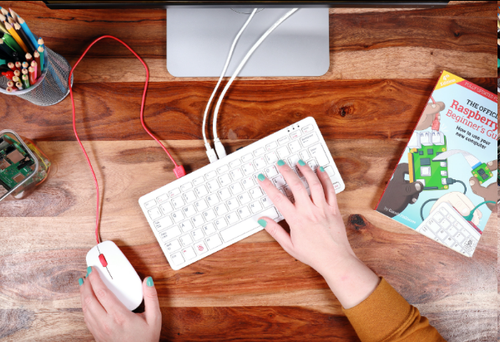
The official Complete Kit includes the Pi 400 keyboard unit, USB-C power supply, micro-HDMI cable, mouse, 16GB microSD card with Raspberry Pi OS preloaded, and the Beginner's Guide book. This represents the baseline choice for student computing.
What's included:
Pi 400 keyboard computer (quad-core 1.8GHz processor, 4GB RAM)
Official mouse
Power adapter
Micro-HDMI to HDMI cable (1 meter)
16GB microSD card with OS
Beginner's Guide physical book
What you need to add:
HDMI monitor or TV
Optional: USB keyboard for extended typing (the membrane keyboard works but isn't ideal for long sessions)
This configuration costs between $70-100 depending on retailer and has seen price reductions as of December 2024. The setup assumes students have access to a display, making it economical for home environments where a TV or spare monitor exists.
Standalone Unit
Some retailers offer just the Pi 400 keyboard with a microSD card, no accessories. This makes sense only if you're building a custom setup or already own compatible peripherals from another Raspberry Pi project.
Best for:
Families upgrading from Pi 3 or Pi 4
Schools purchasing bulk units with existing accessories
Students who want to choose their own mouse and cables
Risks:
Easy to buy incompatible accessories (wrong cable types, insufficient power supply)
Can end up costing more than the Complete Kit after buying everything separately
Students lose the structured learning path from the Beginner's Guide
Most educators recommend against this option for first-time Pi users. The cost savings ($15-20) disappear quickly when you factor in shipping multiple items and potential compatibility issues.
Monitor-Bundled Kits
Several manufacturers create all-in-one packages by combining the Complete Kit with portable displays. These transform the Pi 400 into a truly portable learning workstation.
7-inch touchscreen bundle ($180-200):
Complete Kit components
7-inch 1024×600 touchscreen display
Kickstand for stability
USB-powered (no extra power brick)
13.3-inch touchscreen bundle ($250-270):
Complete Kit components
13.3-inch 1920×1080 Full HD display
Built-in speakers
10-point touch capability
Requires separate power supply
The larger display approaches laptop-like usability while maintaining the Pi's affordability advantage over traditional computers. Students can transport everything in a backpack, making these bundles popular for coding clubs and shared learning spaces.
Student Age and Experience Framework
The right kit varies dramatically based on developmental stage and programming background.
Elementary Students (Ages 7-11)
Recommended: 13.3-inch touchscreen bundle or Complete Kit with existing family TV
Elementary students benefit from larger displays that reduce eye strain and provide space for visual programming environments like Scratch. The Pi 400's included Scratch software works best with screen real estate to see code blocks and sprite stages simultaneously.
These students typically share equipment with family members, making portability less critical than ease of use. A parent in New Jersey reported their 9-year-old adapted to the Pi 400 faster than expected, though the membrane keyboard required some adjustment compared to school Chromebooks.
Key considerations:
Touchscreens add intuitive interaction for Scratch projects
Physical programming books (included in Complete Kit) help when screens overwhelm
Shared family computers often have HDMI displays available
The Complete Kit paired with a household TV creates an effective learning station without additional monitor costs. However, this ties up the TV during study sessions-something to negotiate with family schedules.
Middle School Students (Ages 12-14)
Recommended: Complete Kit (with existing monitor) or 7-inch portable setup
Middle schoolers begin text-based programming in Python, which requires less screen space than visual environments. They also value independence-the ability to code without competing for family computer time.
Public libraries that implemented Pi 400 programs found this age group adapts quickly to the keyboard form factor. A Chautauqua-Cattaraugus Library program successfully taught Python to 4th and 6th graders using just the Complete Kit with VGA monitors.
Key considerations:
Need dedicated workspace for homework and projects
GPIO pin access matters for physical computing projects
Portability enables coding club participation
The 7-inch bundle provides personal computing without requiring a permanent desk setup. Students can move between kitchen table, bedroom, and coding clubs easily. The smaller screen suffices for Python terminal work and simple game development.
High School Students (Ages 15-18)
Recommended: Complete Kit with quality external monitor
High school projects demand serious screen space. Students work with multiple files open, reference documentation, and run complex development environments. The Pi 400's dual-display capability becomes valuable here.
Advanced students also explore hardware projects through the GPIO pins, making monitor flexibility important. A fixed all-in-one display limits the ability to reposition the keyboard when connecting sensors, motors, or other components.
Key considerations:
Multi-file programming workflows need screen space
AP Computer Science courses have specific environment requirements
College prep portfolios require professional-quality project work
Invest in a decent 1920×1080 monitor rather than bundled displays. High schoolers benefit more from ergonomic setup than portability, and a proper monitor serves them through college while the Pi 400 might get replaced with more powerful boards.
The Monitor Question
The Pi 400's biggest advantage-its compact keyboard design-creates its biggest challenge: no included display.
Using What You Have
Most homes contain compatible displays:
HDTVs with HDMI input (any TV from the last 10 years)
Computer monitors with HDMI (directly compatible)
Older VGA monitors (requires HDMI-to-VGA adapter, $8-15)
The one-meter HDMI cable included in the Complete Kit works for desk setups but falls short for TV connections across a room. Budget $10-15 for a three-meter cable if connecting to a living room TV.
TV limitations:
Scheduling conflicts with family viewing
Not ideal for homework requiring sustained focus
Often too large (eye strain from oversized text)
One parent's experience: "We started on the family TV but bought a cheap HDMI monitor within two weeks. The Pi 400 works great, but fighting for screen time doesn't."
Buying a Monitor
New HDMI monitors range from $70-150 for student-appropriate sizes:
21.5-inch 1080p: $70-90 (sweet spot for programming)
24-inch 1080p: $100-130 (preferred by older students)
Used/refurbished: $40-60 (check local classifieds)
This addition pushes total cost to $140-200 for a complete student workstation-still dramatically cheaper than laptops ($300+) or tablets with keyboards ($250+).
Alternative: Portable Displays
The bundled touchscreen kits solve the display problem but introduce new tradeoffs.
7-inch display advantages:
Truly portable (fits in backpack with Pi 400)
USB-powered from the Pi itself
Touch interaction for creative projects
Total package under $200
7-inch display limitations:
Screen feels cramped for text editing
1024×600 resolution limits what fits on screen
Awkward viewing angle with keyboard in front
13.3-inch display advantages:
Laptop-like experience
1080p resolution for professional work
Built-in speakers eliminate need for headphones
Proper productivity dimensions
13.3-inch display limitations:
Requires separate power outlet (not USB-powered)
At $250-270, approaches budget laptop pricing
Less portable than 7-inch option
Students serious about programming generally outgrow 7-inch displays within months. The 13.3-inch option makes sense for specific scenarios-students without access to monitors, coding camp setups, or families wanting a complete portable solution.
Hidden Costs and Considerations
The advertised kit price represents just the starting point. Budget for these common additions:
Storage Expansion
The included 16GB microSD card suffices for basic programming but fills quickly with projects, games, and multimedia files. Students working with Python libraries, downloaded code examples, or video projects need more space.
Recommended: 32GB or 64GB SanDisk Extreme microSD card ($8-15)
The speed class matters more than capacity for some applications. Look for A1 or A2 class cards-they improve OS responsiveness noticeably compared to the included card.
Better Keyboard Option
The Pi 400's membrane keyboard functions adequately but frustrates touch typists. Forum discussions reveal this as a common complaint among adults who grew up on mechanical or quality laptop keyboards.
Students learning to type alongside learning to code actually adapt better to the membrane keyboard-it's similar to what they use in schools. Consider this a feature for younger students (consistent experience) and a limitation for older teens.
Solution for advanced students: Use the Pi 400 primarily as the computer module and connect a USB keyboard for long programming sessions. This preserves portability while improving typing comfort.
GPIO Accessories
One of the Pi 400's educational advantages-the exposed GPIO pins-requires accessories for hands-on electronics projects.
Starter electronics kit: $20-40
Breadboard
LEDs and resistors
Jumper wires
Basic sensors
GPIO extender cable: $3-5 (necessary for the Pi 400 specifically)
The Pi 400's keyboard form factor places GPIO pins at the back, making them awkward to access. A ribbon cable brings the pins forward to a comfortable working position. Budget this immediately if physical computing projects interest the student.
Internet Connectivity
The Pi 400 includes dual-band WiFi and Bluetooth 5.0, but some educational environments require wired connections.
Ethernet cable: $5-10 (if your router sits far from the student's workspace)
The built-in Gigabit Ethernet port handles video streaming, large file downloads, and remote programming without WiFi interference. Schools often mandate wired connections for computer labs-verify requirements before assuming WiFi suffices.
Audio Solution
The Pi 400 lacks a 3.5mm headphone jack-a notable omission for a student computer. Audio outputs through HDMI to the monitor or via Bluetooth.
Options:
Monitor with built-in speakers (many don't have them)
Bluetooth headphones (the Pi 400 supports Bluetooth 5.0)
USB sound card with 3.5mm jack ($8-12)
Students watching coding tutorials or participating in virtual learning need functional audio. The 13.3-inch bundled displays include speakers, solving this problem automatically. Other configurations require planning.

Complete Cost Breakdown
Let's calculate total investment for three realistic student scenarios:
Budget Setup (Using Existing TV)
Pi 400 Complete Kit: $75-100
Longer HDMI cable: $10
32GB microSD card: $10
Total: $95-120
Works if family TV availability isn't an issue and student doesn't need dedicated workspace.
Standard Student Setup (New Monitor)
Pi 400 Complete Kit: $75-100
21.5-inch HDMI monitor: $75
GPIO extender cable: $4
Electronics starter kit: $25
USB sound card: $10
Total: $189-214
Represents the complete learning station for students ages 10-16 pursuing programming and physical computing.
Portable Complete Setup
Pi 400 + 13.3-inch touchscreen bundle: $260
64GB microSD card: $12
GPIO extender cable: $4
Protective sleeve: $15
Total: $291
For students attending coding clubs, shared custody situations, or lacking permanent workspace.
Software and Learning Resources
The Complete Kit's physical Beginner's Guide provides structured introduction, but students quickly need additional resources.
Pre-Installed Software
Raspberry Pi OS includes programming environments students need immediately:
Scratch 3: Visual programming for beginners (ages 7-12)
Python 3: Text-based programming (ages 10+)
Thonny IDE: Beginner-friendly Python editor
Mu: Another Python editor focused on education
Sonic Pi: Music programming
Mathematica: Advanced mathematics (free on Pi)
Students can start exploring without downloading anything. The OS also includes LibreOffice for document creation and Chromium browser for web access.
Free Online Resources
The Raspberry Pi Foundation provides extensive educational materials:
projects.raspberrypi.org: Step-by-step project guides
Code Club Projects: Structured curricula for clubs
Hello World Magazine: Free PDF computing education magazine
These resources align with the Pi 400's capabilities and assume students use Raspberry Pi OS. Other platforms like Code.org and Khan Academy provide complementary programming instruction.
Common Challenges
Forum discussions and educational program reports reveal typical obstacles:
DRM content streaming: Netflix, Disney+, and similar services have limited support on Raspberry Pi OS. This frustrates students wanting to watch tutorials or take study breaks. The Chromium browser includes Widevine DRM, but some services remain incompatible.
Software compatibility: Some educational software assumes Windows or macOS. Teachers need to verify applications work on Raspberry Pi OS (a Debian Linux variant) before assigning projects requiring specific tools.
Documentation gaps: The included Beginner's Guide covers basics well, but keyboard shortcuts and Pi 400-specific features require online research. F10 functions as a power button, for example-not documented prominently.
Pi 400 vs. Alternative Student Computers
Understanding where the Pi 400 excels and struggles helps set appropriate expectations.
Advantages Over Traditional Options
vs. Budget Chromebooks ($200-300):
Open platform-students can experiment deeply
Teaches actual programming, not just app usage
GPIO pins enable robotics and electronics projects
No forced Google account or ecosystem lock-in
vs. Tablets with Keyboards ($250-400):
Real desktop environment with proper file system
Industry-standard programming tools
Multiple USB ports for peripherals
Repairable and upgradable (swap SD card, add components)
vs. Budget Laptops ($300-500):
Half the cost for programming-focused work
Better learning resources (designed for education)
Physical computing capabilities through GPIO
Silent operation (no fan noise)
Disadvantages
The Pi 400 struggles with tasks students might assume any computer handles:
Web conferencing: Zoom, Google Meet work but stress the hardware with video on
Modern web apps: Google Docs usable but slower than dedicated machines
Gaming: Retro game emulation works great, but no current-generation games
Video editing: Basic editing only-4K projects exceed capabilities
It's a learning computer, not a replacement for every computing need. Families with multiple devices find this acceptable. Single-device families might struggle.
The Upgrade Question
Parents frequently ask whether students outgrow the Pi 400 quickly. Evidence from educational programs and forum discussions suggests a two-year useful life for most students:
Years 1-2: Pi 400 handles all age-appropriate programming learning, from Scratch through intermediate Python. GPIO projects remain engaging through robotics and sensor integration.
Years 3+: Advanced students need more RAM (the 4GB limit becomes noticeable) and faster processors for data science, machine learning, or video game development in engines like Unity.
The Pi 400 keyboard unit remains useful even after students move to more powerful computers-it continues functioning as a lightweight coding station, home automation controller, or retro gaming system. The educational investment extends beyond the student's learning phase.
Buying Recommendations
Based on age, budget, and learning goals:
For elementary students (7-11) just starting programming: Get the Complete Kit and use an existing family TV or monitor. The included Beginner's Guide and Scratch software provide months of learning before additional resources become necessary. Total investment: $75-100.
For middle school students (12-14) with programming interest: Complete Kit plus a dedicated 21.5-inch monitor creates a personal workspace that supports years of learning. Add a starter electronics kit if physical computing projects interest them. Total investment: $190-220.
For high school students (15-18) serious about computer science: Complete Kit with a 24-inch monitor (preferably 1920×1080 IPS panel). Consider two monitors using both micro-HDMI ports for advanced workflows. Skip portable displays-they'll need proper ergonomics. Total investment: $200-250.
For families without any available monitors: The 13.3-inch touchscreen bundle provides a complete solution, though expensive. Alternatively, watch for refurbished monitors locally-Facebook Marketplace and Craigslist regularly feature $30-50 displays. Total investment: $260 (bundle) or $110-150 (Complete Kit + used monitor).
For coding clubs and shared learning spaces: Multiple Complete Kits with shared monitors on rotation. Most coding clubs operate 2-3 hour sessions where students take turns at workstations. Five Complete Kits plus three monitors creates a functional 8-student rotation at lower cost than fully-independent setups. Total investment: $500-600 per 8-student setup.
What About the Raspberry Pi 5?
The Pi 5 launched in 2023 with significantly more power but no keyboard form factor exists yet. For student programming, the Pi 400's advantages outweigh the Pi 5's performance gains:
The Pi 400's all-in-one design reduces setup intimidation
Lower price point ($75-100 vs. $60-80 for Pi 5 board plus $40+ case, keyboard, etc.)
Proven educational ecosystem with years of student-tested resources
Adequate performance for Python, Scratch, and basic web development
Students reaching the Pi 400's performance limits have already progressed beyond beginner learning and can justify a Pi 5, used laptop, or budget desktop for their next stage.
As of December 2024, Raspberry Pi reduced the Pi 400 pricing and increased included SD card capacity from 16GB to 32GB, making it even more competitive for educational use.
Setting Up for Success
The hardware choice matters, but student success depends equally on learning structure and family support.
First Week Goals
Help students achieve these milestones within seven days:
Successfully boot and navigate the desktop environment
Complete one Scratch project (even something simple)
Write and run a "Hello World" Python program
Create a folder structure for organizing projects
Bookmark the projects.raspberrypi.org website
These accomplishments build confidence more than reading documentation. The physical Beginner's Guide includes activities that hit most of these milestones.
Avoiding Common Pitfalls
Don't start with hardware projects immediately. Students need software confidence before adding physical computing complexity. Spend at least 2-3 weeks on screen-only programming before introducing LEDs and sensors.
Don't let them skip basics for "cool" projects. Jumping to game development or website creation without understanding variables, loops, and functions creates frustrating debugging experiences. The projects.raspberrypi.org guides progress logically-follow them.
Don't treat it like a locked-down school computer. The Pi 400's advantage is experimentation. Let students customize themes, install programs, break things, and reinstall the OS. The microSD card makes starting fresh trivial-backup important projects and experiment freely.
Parent Involvement Strategies
Non-technical parents can support student learning without knowing how to code:
Learn alongside them. Work through Scratch or Python tutorials together. Your struggles and questions model problem-solving approaches more valuable than perfect technical knowledge.
Focus on project celebration, not code review. When students complete projects, ask them to demonstrate and explain. "How did you make that work?" encourages articulation of technical concepts.
Connect to interests beyond computers. Students passionate about art can explore Python graphics libraries. Math enthusiasts can tackle Project Euler problems. Sports fans can analyze statistics. Music learners can experiment with Sonic Pi. The Pi 400 connects to almost any interest area through code.
Making the Purchase
Pi 400 availability improved significantly in 2024 after earlier supply chain constraints.
Authorized Retailers
Buy from official Raspberry Pi Approved Resellers to ensure authentic products and support:
raspberrypi.com (direct, but often directs to resellers)
thepihut.com (UK-based, international shipping)
canakit.com (US-focused)
adafruit.com (US)
sparkfun.com (US)
Amazon lists Pi 400 kits but verify the seller is an authorized reseller. Third-party sellers sometimes bundle unofficial accessories or charge premiums during supply shortages.
Kit Configuration Verification
Before purchasing, confirm:
Keyboard layout matches your region (US, UK, German, French, etc.)
Power supply voltage matches your country (UK needs UK plug, US needs US, etc.)
Kit includes microSD card preloaded with OS
Physical Beginner's Guide is included (not all sellers include it)
The official Complete Kit should contain seven items: keyboard unit, mouse, power supply, HDMI cable, microSD card with OS, and guidebook. If listings show fewer components, verify what's missing.
Warranty and Support
Raspberry Pi products include limited warranty through authorized resellers. Keep purchase receipts and packaging for the first 30-60 days until you've confirmed everything works.
The Raspberry Pi Forums (forums.raspberrypi.com) provide active community support. Students and parents both benefit from reading the Beginners section before posting questions-most common issues have detailed solutions already documented.
When the Pi 400 Isn't Right
Some student situations call for different solutions:
Special education needs: Students requiring assistive technologies may need mainstream computers with established accessibility software. The Pi 400 supports basic accessibility but lacks the mature ecosystem of Windows or macOS solutions.
Resource-intensive coursework: Students in video production, 3D modeling, or CAD classes need more powerful hardware. The Pi 400 works for learning programming and general computing but can't handle professional creative software.
School requirement for specific OS: Some schools mandate Windows or macOS for homework submission systems. Verify compatibility before committing to Raspberry Pi OS as a student's primary computer.
Family's sole computer: If the Pi 400 would be the only computing device in a household, consider a mainstream computer instead. Families need flexibility for online bill payment, job applications, and other tasks where compatibility matters more than learning.
The Pi 400 excels as a student's learning device supplementing, not replacing, family computing resources.
The Pi 400 represents a specific tool for a specific purpose: teaching students to program and explore computing. For families with that goal and realistic expectations, the Complete Kit provides remarkable value. Students get hands-on experience with real programming environments, not simplified educational apps, at a fraction of mainstream computer costs. The keyboard format removes intimidating assembly while preserving access to the GPIO pins that make physical computing projects possible.
Most students aged 8-16 learning programming will thrive with the standard Complete Kit paired with whatever display makes sense for their situation-existing TV, new monitor, or portable screen. Younger students benefit from touchscreen interaction but don't need it. Older students want serious screen space for multi-file workflows. Budget the complete setup cost honestly, including inevitable storage upgrades and audio solutions, and the Pi 400 delivers years of educational value.
Frequently Asked Questions
Can the Pi 400 run Minecraft for learning programming through modding?
Minecraft Java Edition runs on the Pi 400 but performance is limited. Minecraft Pi Edition-a special version for Raspberry Pi-includes Python programming interface and runs smoothly. This version supports modding activities suitable for learning but differs from the commercial Minecraft most students play. For Minecraft-based learning, the Pi Edition works fine. For playing regular Minecraft with friends, the Pi 400 struggles.
How long does the Pi 400 take to set up out of the box?
The Complete Kit with preloaded microSD card requires about 10 minutes for physical setup: connecting cables, powering on, and running initial setup wizard. Students can start using Scratch or Python within 15-20 minutes total. Without the preloaded card (standalone units), plan 30-45 minutes to download Raspberry Pi OS, write it to a microSD card, and complete setup-this assumes basic computer literacy.
Can multiple students share one Pi 400?
Yes, through individual user accounts. Raspberry Pi OS supports multiple users with separate files and settings. Setup takes about 3 minutes per additional user. This works well for siblings or classroom situations where students work at different times. Simultaneous use isn't possible-only one keyboard exists. For coding clubs with multiple students at once, buy multiple units.
What happens if a student breaks something in the software?
Reinstall Raspberry Pi OS by rewriting the microSD card-takes about 15 minutes and requires another computer with SD card reader. This complete reinstall approach is actually a teaching opportunity: students learn systems can be rebuilt, reducing fear of experimentation. Back up important projects regularly to USB drives or cloud storage. Many parents keep a second microSD card with fresh OS as insurance, swapping cards for quick recovery ($8 additional investment).
Related Topics for Further Exploration:
Raspberry Pi programming languages for different age groups
Building electronics projects with GPIO pins
Raspberry Pi alternatives for student computing (Pi 4, Pi 5, alternative single-board computers)
Setting up Raspberry Pi for retro gaming education
Using Raspberry Pi in homeschool curricula