





How Does Raspberry Pi 4 8GB Kit Perform?
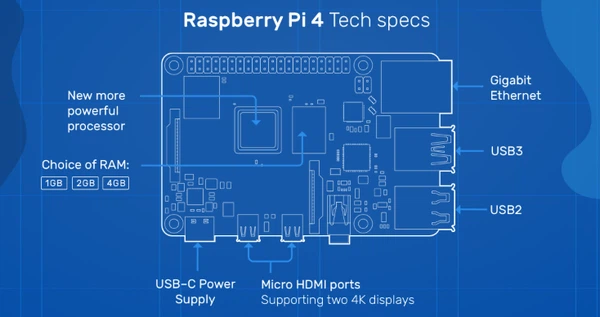
The Raspberry Pi 4 8GB kit delivers desktop-comparable performance for multitasking, web browsing, and productivity tasks, with the 8GB RAM providing substantial headroom for running multiple applications simultaneously. Equipped with a 1.5GHz quad-core Cortex-A72 processor and paired with essential accessories like cooling solutions and power supplies, these kits handle everything from media streaming to light development work effectively.
Raspberry Pi 4 8GB Kit Core Performance Capabilities
The performance foundation rests on Broadcom's BCM2711 system-on-chip, featuring four ARM Cortex-A72 cores running at 1.5GHz. This represents a three-fold performance improvement over the Raspberry Pi 3 Model B+, primarily due to the architectural upgrade from Cortex-A53 to the more powerful A72 design.
When Tom's Hardware tested the 8GB model against its 4GB sibling, the results revealed minimal differences in most scenarios. Both models scored nearly identically in 7-Zip compression benchmarks and Apache web server tests, with variations falling within normal margin of error. The RAMspeed synthetic memory test showed the 8GB model achieving 4175.2 MBps for integer transfers and 3954.2 MBps for floating-point operations, essentially matching the 4GB version.
The standout scenario where 8GB truly excels involves handling extremely large files. In IOzone testing with 4GB datasets, the 8GB Raspberry Pi 4 demonstrated read speeds more than 20 times faster than the 4GB model, thanks to its ability to cache the entire dataset in memory. For workflows involving multi-gigabyte file operations, this capacity makes a measurable difference.
Raspberry Pi 4 8GB Kit Real-World Desktop Performance
Desktop computing represents one of the most demanding use cases, pushing both processor and memory resources. Running Raspberry Pi OS with a graphical desktop, the bare system consumes roughly 440MB of RAM. Opening Chromium browser with moderate tabs brings usage to around 645MB, while adding applications like GIMP image editor, LibreOffice Calc, and Scratch Desktop 3 pushed total memory consumption to 3.4GB.
The sweet spot for comfortable desktop use appears around 4GB of active memory usage. Testing with 59 browser tabs open, several playing 4K video simultaneously, achieved 4.4GB of RAM usage, leaving substantial overhead even on the 32-bit operating system that makes 7.8GB of the full 8GB available.
Application launch times show marginal improvements with the 8GB model, typically 0.1 to 0.3 seconds faster when opening programs like LibreOffice Calc, GIMP, or Chromium. The one anomaly: boot times averaged 2.6 seconds slower on the 8GB version compared to 4GB, though this doesn't impact day-to-day usability.
Raspberry Pi 4 8GB Kit Components and Accessories Impact
Most Raspberry Pi 4 8GB kits bundle essential components that significantly affect overall performance and longevity. Understanding what these accessories contribute helps maximize the kit's capabilities.
Raspberry Pi 4 8GB Kit Cooling Solutions Performance
Thermal management proves critical for sustained performance. The Raspberry Pi 4 begins throttling at 80°C, reducing clock speeds from 1.5GHz to 1.0GHz or lower to prevent damage. Without any cooling, temperatures can reach 74°C under stress testing within minutes, with frequent throttling episodes degrading performance.
Basic aluminum heatsinks typically reduce peak temperatures by 5-10°C. Testing by Geeks3D showed that four heatsinks designed for the Pi 4 kept idle temperatures at 55°C and stress test peaks at 74°C, compared to higher readings without cooling. While helpful, passive cooling alone doesn't prevent throttling during sustained heavy workloads.

Active cooling with even small 30mm fans makes dramatic differences. Jeff Geerling's comprehensive testing demonstrated that a simple fan setup maintained temperatures around 45-55°C under load, completely eliminating thermal throttling. The ICE Tower cooler, popular in many premium kits, keeps temperatures around 30°C idle and 45°C under sustained load, providing substantial headroom even for overclocking attempts.
Kit-included PWM fans offer intelligent cooling, ramping speed based on temperature. The CanaKit and LABISTS 8GB kits feature fans that maintain steady 40-50°C operation during typical use, activating fully only when workloads intensify. This balanced approach prevents both overheating and unnecessary noise.
Raspberry Pi 4 8GB Kit Storage Performance Considerations
The MicroSD card included in starter kits fundamentally impacts system responsiveness. Premium kits like the CanaKit Extreme edition include 128GB EVO+ Class 10 cards with read speeds up to 100MB/s, while budget offerings may provide 32GB cards with significantly slower performance.
Real-world differences become apparent during boot and application launches. A high-quality 128GB card boots Raspberry Pi OS in approximately 30-40 seconds, while slower cards can take 50-60 seconds. Applications like Scratch Desktop 3, which normally take 28 seconds to load from a standard MicroSD, would benefit enormously from faster storage solutions.
Many advanced users migrate to USB 3.0 connected SSDs, which the Pi 4's USB 3.0 ports support natively. This upgrade typically delivers 10x faster transfer speeds compared to MicroSD cards, transforming the desktop experience. Boot times drop to 15-20 seconds, and large file operations become vastly more efficient.
Raspberry Pi 4 8GB Kit Power Supply Quality Effects
The official Raspberry Pi 4 power supply provides 5.1V at 3A (15.3W), specifically designed to handle the board's increased power demands. Inadequate power supplies cause low voltage warnings, USB device failures, and unexpected throttling even at safe temperatures.
Testing by community members revealed that running USB 3.0 SSDs while using wireless peripherals could trigger low voltage warnings with marginal 3A supplies. Some users successfully upgraded to 5V 5A power adapters (like the COMSOL brand mentioned in Hackaday discussions), eliminating power issues entirely even when driving multiple 2-4TB external hard drives.
Premium kits from CanaKit, LABISTS, and GeeekPi include certified power supplies with noise filtering, ensuring stable voltage delivery. The integrated on/off switches found in many kits eliminate the need to repeatedly plug and unplug the power cable, extending connector lifespan.
Raspberry Pi 4 8GB Kit Performance Across Different Workloads
Performance characteristics vary dramatically depending on workload type, with the 8GB capacity proving essential for some tasks while offering minimal benefit for others.
Raspberry Pi 4 8GB Kit Multitasking and Productivity Performance
For standard productivity tasks involving web browsing, document editing, and light image manipulation, the 8GB Raspberry Pi 4 handles workloads comparable to entry-level x86 PCs from the early 2010s. Users report successfully running LibreOffice suites, handling 18,000-row spreadsheets, editing images in GIMP, and maintaining 20-30 browser tabs simultaneously.
The key advantage of 8GB emerges during heavy multitasking. While a 4GB model might struggle when running a database, multiple development tools, and numerous browser tabs, the 8GB version maintains responsive performance. This makes it viable for developers running local web servers, databases, and multiple text editors concurrently.
Email management, Google Drive access, and YouTube video playback work smoothly through Chromium browser. Users running Pi-Hole network-wide ad blocking alongside media streaming report sustained 43-44°C temperatures under continuous operation with proper cooling, indicating stable long-term performance.
Raspberry Pi 4 8GB Kit Media Streaming and Entertainment Performance
Hardware video decoding capabilities enable smooth 4K playback at 60fps through the VideoCore VI GPU. The Pi 4 supports dual 4K displays simultaneously, making it suitable as a media center when paired with appropriate software like Kodi or LibreELEC.
Testing shows reliable 1080p YouTube playback with reasonable frame rates, though 4K web video can stress the system depending on encoding. Locally stored 4K video files play smoothly when using hardware acceleration, taking full advantage of the HEVC decoder.
For retro gaming and emulation via RetroPie, the 8GB model offers no advantages over 4GB or even 2GB versions. Emulation depends primarily on CPU and GPU performance rather than RAM capacity, with all Pi 4 variants handling systems up through PlayStation 1 and some Nintendo 64 titles comparably.
Raspberry Pi 4 8GB Kit Development and Server Performance
Development workloads reveal where 8GB truly shines. Running Docker containers, virtual machines, or Kubernetes clusters benefits substantially from the additional memory. Users report successfully running small Kubernetes clusters on Pi 4 8GB boards, though performance remains modest compared to dedicated server hardware.
Database operations represent another strong use case. MySQL or PostgreSQL instances serving moderate traffic run comfortably within the 8GB envelope, especially when using RAM caching strategies. For small business applications or development databases, this capacity proves adequate.
Compile times for large codebases benefit from the extra RAM, allowing more aggressive caching. Users compiling software like OpenBLAS or custom kernels report smoother experiences compared to memory-constrained models, with fewer swap file accesses degrading performance.
Web serving capacity increases with more RAM for caching. Apache or Nginx servers can handle more concurrent connections and cache more frequently accessed content, improving response times for small to medium traffic levels. Expect to handle several dozen to a few hundred concurrent users depending on application complexity.
Raspberry Pi 4 8GB Kit Performance Limitations and Bottlenecks
Understanding performance boundaries helps set realistic expectations and identify scenarios where the Pi 4 8GB may not suffice.
The ARM Cortex-A72 architecture, while efficient, still lags x86 desktop processors by substantial margins. Phoronix testing comparing Pi 4 against Intel Celeron and Pentium processors showed the Pi could be 6-10 times slower for CPU-intensive tasks. The 28nm manufacturing process places it technologically around 2011-era mobile processors in terms of raw compute power.
Single-threaded performance particularly lags modern systems. Applications that cannot effectively utilize all four cores will feel sluggish compared to contemporary desktop CPUs. This affects some older software not optimized for multi-core operation.
Graphics performance, while improved over previous generations, remains limited for modern 3D applications. The VideoCore VI handles lightweight gaming and video acceleration well, but intensive graphics workloads quickly reveal limitations. Running modern desktop environments with heavy compositor effects can strain the system.
Storage I/O through MicroSD cards represents a persistent bottleneck. Even high-quality cards max out around 100MB/s sequential reads, while random I/O performance falls far below SSD standards. This impacts database operations, compilation workflows, and any scenario involving frequent small file accesses. Upgrading to USB 3.0 SSD partially addresses this but adds cost and complexity.
Raspberry Pi 4 8GB Kit Long-Term Performance and Reliability
Sustained operation reveals reliability considerations beyond benchmark numbers. The thermal management system prioritizes component safety over performance, implementing automatic throttling above 80°C and hard shutdown protection near 85°C.
Community testing shows properly cooled Pi 4 boards running continuously for months or years without degradation. Users operating Pi-Hole servers, media centers, and home automation hubs report stable 24/7 operation when equipped with adequate cooling and quality power supplies.
Fan longevity represents the primary maintenance concern for actively cooled setups. Small 30mm fans may wear out after 1-2 years of continuous operation, producing bearing noise or failing entirely. Selecting quality fans (like Noctua's 5V models) or using passive cooling for moderate workloads extends maintenance intervals.
MicroSD card longevity varies with usage patterns. Heavy write operations (logging, database updates, compilation) gradually wear flash memory, potentially causing failures after 1-3 years. Migrating to USB SSD or implementing RAM disk strategies for write-heavy operations significantly extends reliability.
The Pi 4's thermal management system protects components even under extreme conditions. Element14 testing pushed Pi systems beyond 100°C before failures occurred, and even then, the boards recovered fully after cooling, suggesting robust protection mechanisms.
Raspberry Pi 4 8GB Kit Value and Use Case Fit
At $75 for the board alone or $120-180 for complete kits, the 8GB Raspberry Pi 4 occupies a specific market position. For users already owning a 4GB model running typical Pi workloads, upgrading rarely makes sense unless running specific RAM-intensive applications.
First-time buyers choosing between 4GB and 8GB configurations face a $20 difference. This premium makes sense for users planning desktop replacement duties, development work with multiple tools, or server applications. The 8GB version future-proofs against software requirements increasing over the next few years.
For dedicated applications like media centers, retro gaming, or simple servers, the 4GB or even 2GB variants often suffice. The 8GB capacity only matters when applications genuinely need that memory, which excludes most single-purpose appliance deployments.
Computing cluster builders find 8GB valuable for parallel computing tasks where aggregate memory capacity matters. Each node contributing more RAM enables larger datasets or more virtual machines across the cluster, though raw performance per node remains constrained by CPU capabilities.
Frequently Asked Questions
Does Raspberry Pi 4 8GB kit need active cooling?
Active cooling isn't strictly required but strongly recommended for sustained heavy workloads. Light usage with good ventilation keeps temperatures under 80°C without fans, but any intensive task like video encoding, gaming, or compilation will trigger thermal throttling without active cooling. Budget at least $10 for a fan or heatsink.
Can Raspberry Pi 4 8GB kit replace a desktop computer?
For basic computing tasks including web browsing, office productivity, email, and media playback, the 8GB model provides a workable desktop replacement. However, performance lags modern desktop PCs significantly for intensive applications. Best suited for users with modest computing needs or as a secondary system rather than primary workstation replacement.
What's the actual usable RAM on Raspberry Pi 4 8GB kit?
The 32-bit Raspberry Pi OS provides approximately 7.8GB of usable RAM from the 8GB total, with system overhead consuming the remainder. The 64-bit version shows slightly less at 7.6GB available. Both versions can access the full memory capacity when split across multiple processes, making the full 8GB effectively usable.
How much faster is 8GB model compared to 4GB?
For most tasks, the 8GB and 4GB models perform identically since both share the same CPU, GPU, and clock speeds. The 8GB advantage emerges only when applications genuinely need more than 4GB of memory, such as heavy multitasking with 30+ browser tabs, running virtual machines, large databases, or processing multi-gigabyte files. Application launch times differ by only 0.1-0.3 seconds.
Making the Most of Your Raspberry Pi 4 8GB Kit
Optimizing performance starts with proper thermal management. Install the included heatsinks and fan correctly, ensuring good contact with thermal pads or paste. Position the board with adequate ventilation, avoiding enclosed spaces without airflow. Monitor temperatures using the built-in CPU temperature widget or command-line tools to ensure cooling adequacy.
Storage optimization dramatically improves responsiveness. Consider migrating the operating system to a USB 3.0 SSD after initial setup with the included MicroSD card, using the MicroSD for backup purposes. This single upgrade often provides the most noticeable real-world performance improvement, cutting boot times in half and eliminating storage bottlenecks during intensive operations.
Enable the 64-bit operating system if your applications support it. While currently in beta, Raspberry Pi OS 64-bit will eventually become the standard, providing better performance and full access to the 8GB memory pool within single processes. Early adoption prepares your system for future software requiring 64-bit support.
Manage background processes to maximize available resources. Disable unnecessary services that consume memory or CPU cycles during idle periods. Use lightweight alternatives for system monitoring and avoid running heavy desktop environments if primarily accessing the Pi remotely via SSH or VNC.
Consider RAM disk strategies for frequently accessed data or temporary operations. The substantial 8GB capacity allows dedicating 1-2GB to RAM disk, dramatically accelerating applications that normally load slowly from MicroSD storage. This proves particularly valuable for development tools, compilation temporary files, or frequently accessed media.
The Raspberry Pi 4 8GB kit delivers strong performance for a single-board computer in its price range, particularly excelling at multitasking and memory-intensive applications. While it won't match modern desktop processors, it provides capable computing for numerous applications when properly configured with adequate cooling and quality accessories. Understanding its strengths and limitations ensures you can maximize value from this versatile platform.