





3D Printer Types: A Complete Guide to FDM, SLA, SLS, and More
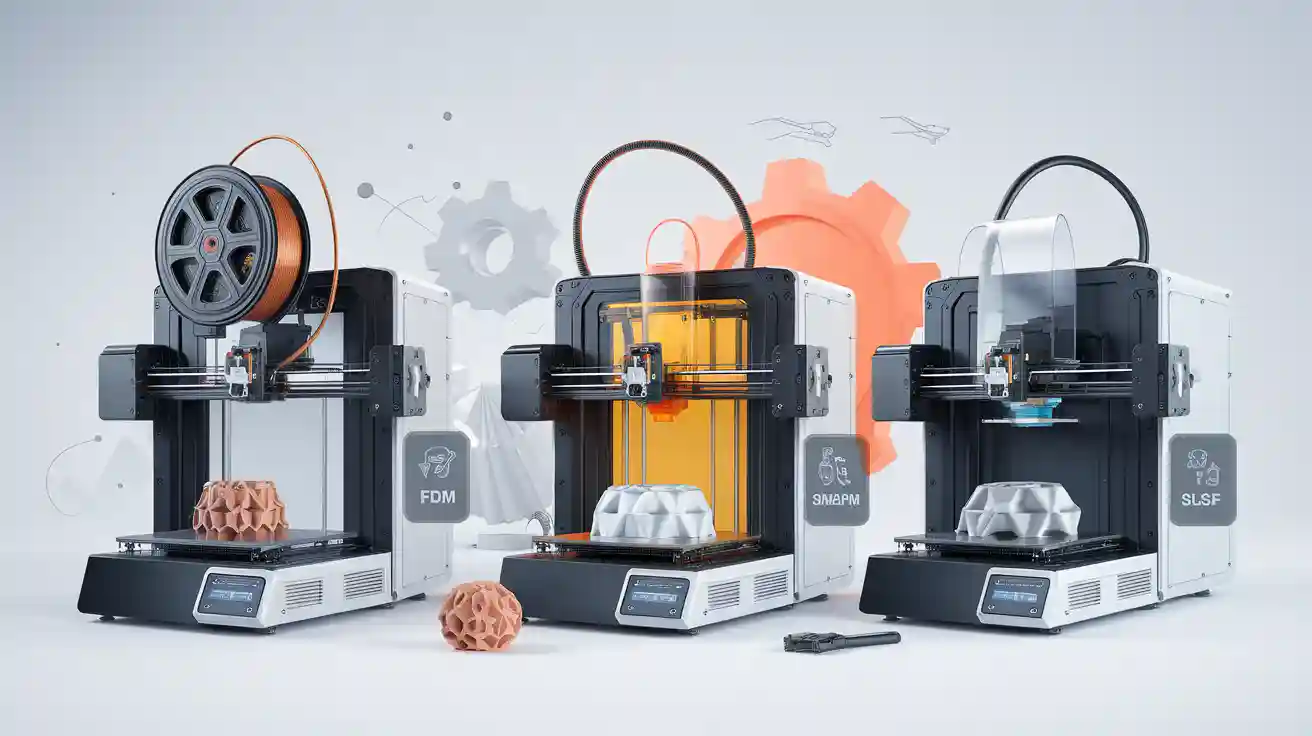
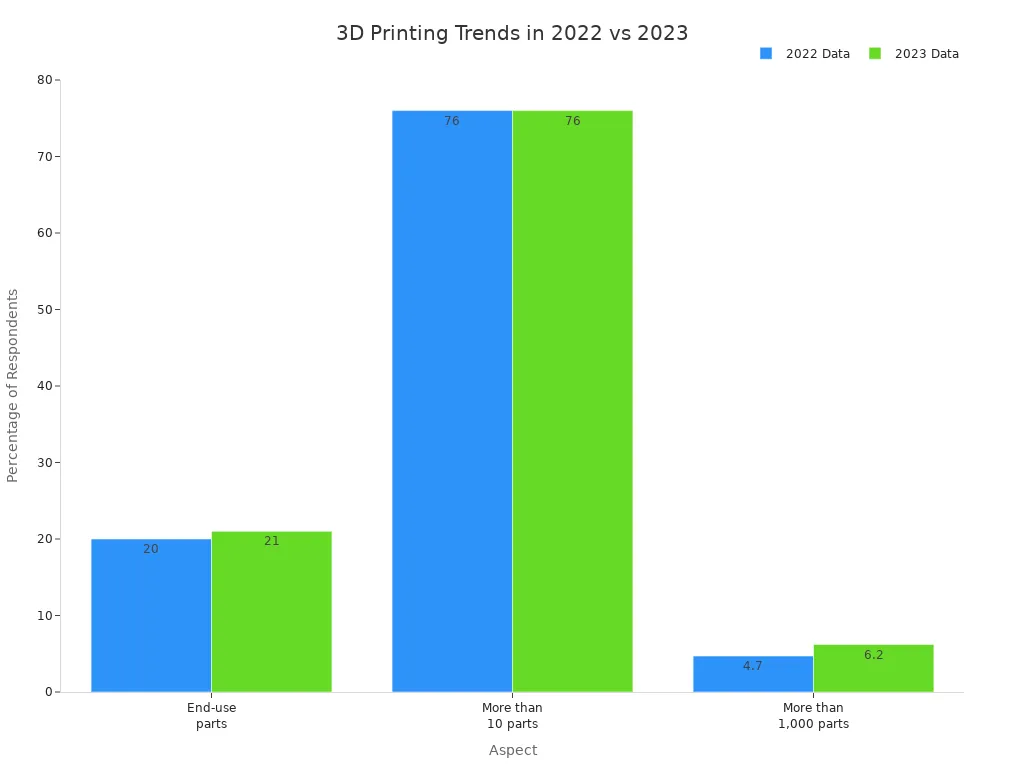
You can pick from seven main 3D Printer Types: FDM, SLA, SLS, DLP, Material Jetting, Binder Jetting, and Directed Energy Deposition. Each one uses a special way to make parts. Some melt plastic filaments. Others cure liquid resin. Some fuse powder with lasers. Your choice changes cost, quality, and how many you can make. It also affects if your project gets certified. Look at the table below to see how printer choice changes production and what businesses worry about:
|
Aspect |
2022 Data |
2023 Data |
|---|---|---|
|
End-use parts |
20% |
21% |
|
Printed >10 parts |
76% |
76% |
|
Printed >1,000 parts |
4.7% |
6.2% |
|
Post-processing concern |
27% |
N/A |
|
Quality concern |
40% |
N/A |
Before you buy, think about what you want to make. Check your budget and what materials you need. Picking the right printer helps you avoid problems and get better results over time.
Key Takeaways
- Learn about the seven main types of 3D printers. These are FDM, SLA, SLS, DLP, Material Jetting, Binder Jetting, and DED. Each type uses different methods and materials. This changes how much they cost and how good the prints are.
- Pick the best printer for your project. FDM works well for fast models. SLA and DLP make prints with lots of detail. SLS and DED are good for strong parts you can use.
- Think about all the costs. This means the price to buy, the cost of materials, and fixing the printer. FDM printers usually cost less. SLA and SLS make better prints but cost more.
- Check if you need to make many prints or need special certificates. Some jobs need certified parts. This can change which printer and materials you pick.
- Plan for what you might need later. Choose a printer that fits your business plans. Make sure it can keep up if you need to make more prints in the future.
3D Printer Types & How They Work
If you know how 3D Printer Types work, you can pick the best one for your business. Each type uses its own process and materials. They give special benefits for different projects. The table below shows how the seven main 3D Printer Types work:
|
Technology |
Core Working Principle |
|---|---|
|
FDM |
Material extrusion process using plastic filaments. |
|
SLA |
Uses a UV laser to cure liquid resin layer by layer. |
|
SLS |
Fuses small particles of powder using a high-power laser. |
|
DLP |
Projects light to cure resin in layers, similar to SLA but faster. |
|
Material Jetting |
Jets layers of curable liquid photopolymer and cures with UV light. |
|
Binder Jetting |
Uses a binding agent to join powder materials layer by layer. |
|
DED |
Feeds material into a melt pool created by a heat source. |
FDM
People use FDM printers because they are reliable and cheap. FDM means Fused Deposition Modeling. The printer melts plastic filament and builds objects in layers. You can pick from many materials. Each material has its own uses and features:
|
Material |
Properties |
Typical Applications |
|---|---|---|
|
PLA |
Versatile, easy to use, not as durable |
General prototyping, educational projects |
|
PETG |
Durable, impact and chemical resistance |
Functional parts, containers, mechanical components |
|
ASA |
Weather and UV resistance |
Outdoor applications, automotive parts |
|
ABS |
Strong impact resistance, toughness |
Functional parts, prototypes, electronics |
|
PEEK |
Exceptional strength, chemical resistance |
Aerospace, automotive, medical devices |
FDM printers make layers between 0.1 and 0.3 mm thick. They print up to 150 mm per second. You see lines on the finished part. You may need extra steps to make it smooth. FDM meets IEC and IEEE safety rules for factories. You save money on materials and repairs. FDM is good for quick samples and small batches.
Tip: FDM printers are easy to fix and use many materials. This helps you spend less time and money on repairs.
SLA
SLA stands for Stereolithography. It makes very accurate parts with smooth surfaces. A UV laser hardens liquid resin in thin layers. SLA printers can make layers as thin as 0.025 mm. They are very precise, up to ±0.05 mm. You can choose from different resins:
- Standard resin: Smooth finish, brittle.
- High detail resin: Precise, higher cost.
- Clear resin: Transparent, needs post-processing.
- Castable resin: For mold patterns, low ash after burnout.
- Tough resin: ABS-like, low thermal resistance.
- High temperature resin: For injection molding, tooling.
- Dental resin: Biocompatible, abrasion resistant.
- Flexible resin: Rubber-like, lower accuracy.
SLA is used in dental, medical, aerospace, cars, and electronics. You get parts with few lines and great detail. SLA meets ITU and IEC rules for making precise things. SLA printers need more care and cost more to run. But you get top quality for hard jobs.
SLS
SLS means Selective Laser Sintering. It uses a strong laser to melt powder together. You can use plastic, metal, or ceramic powders. SLS printers make layers from 0.06 to 0.12 mm thick. They are accurate up to ±0.3 mm. Here are some common powders and their features:
|
Powder |
Tensile Strength (MPa) |
Flexural Strength (MPa) |
Elongation at Break (%) |
Heat Deflection Temp (°C) |
|---|---|---|---|---|
|
PA12 Industrial |
47.61 |
62.31 |
5.86 |
51 |
|
PA11 Carbon Fiber |
65.93 |
87.35 |
8.23 |
167 |
|
Polypropylene (PP) |
19.30 |
25.60 |
44.40 |
50 |
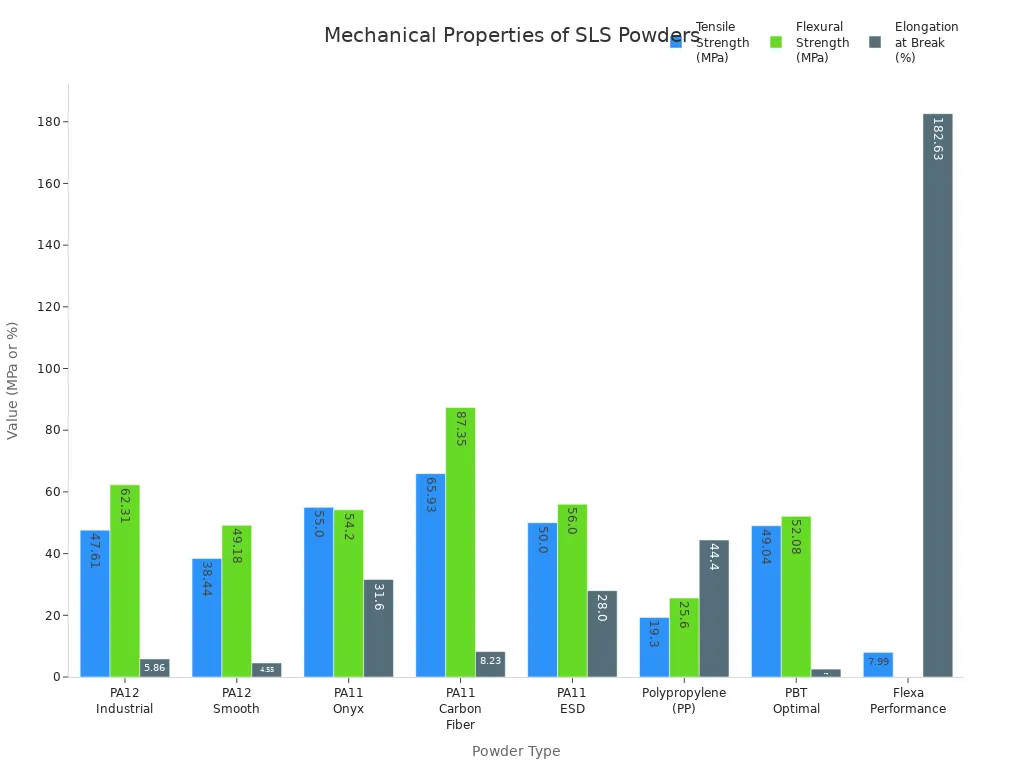
SLS printers are great for strong, bendable parts. You do not need supports. SLS meets IEC and IEEE safety rules for factories. You use SLS for working samples, finished parts, and tricky shapes in cars, planes, and medicine.
DLP
DLP means Digital Light Processing. It uses a projector to harden resin all at once. DLP is faster than SLA and just as accurate. DLP printers have high resolution. The size depends on the projector's pixels. You use regular or special resins. Prices go from $30 to $200 per kilogram.
|
Feature |
DLP Technology |
SLA Technology |
|---|---|---|
|
Light Source |
Digital projector cures entire layer simultaneously |
Laser cures resin point by point |
|
Speed |
Faster, cures whole layer |
Slower, cures each point |
|
Maintenance |
Lower, fewer moving parts |
Higher, more moving parts |
|
Resolution |
Pixel size dependent, can be high |
Laser and optics dependent, very high |
|
Build Process |
Top-down or bottom-up |
Typically upside down in resin tank |
DLP printers are used for teeth, jewelry, and electronics. Speed and detail are important for these jobs. DLP meets IEC rules for light-based making. It also needs less fixing.
Material Jetting
Material Jetting sprays layers of liquid photopolymer onto a tray. UV light hardens each layer. You can use many colors and materials at once. This makes accurate samples and working parts. Material Jetting works with alumina, zirconia, stainless steel, waxes, and UV-cured resins.
|
Material Type |
Description |
|---|---|
|
Alumina |
High strength and durability |
|
Zirconia |
Wear and thermal shock resistance |
|
Stainless Steel |
Strength and corrosion resistance |
|
Waxes |
Detailed models and prototypes |
|
UV-cured Resins |
Flexible, high-temp, or rigid options |
You use Material Jetting in health, planes, and cars. You can switch between hard and soft materials. You can also use many colors. Material Jetting meets IEC and ITU rules for making medical and factory samples.
Note: Material Jetting lets you make touchable and visual samples. You do not need many machines. This saves money over time.
Binder Jetting
Binder Jetting uses glue to stick powder together in layers. You can use metal, sand, ceramic, gypsum, acrylic, and even sugar. Binder Jetting makes full-color models and big parts.
|
Binder Type |
Powder Type |
|---|---|
|
Liquid |
Metals |
|
Liquid |
Sand |
|
Liquid |
Ceramics |
|
Starch |
Gypsum Plaster |
|
Liquid |
Acrylic Powder |
|
Liquid |
Sugar |
Binder Jetting is used in planes, cars, medicine, products, building, electronics, and green energy. You save money on materials. You can make lots of parts and tricky shapes. Binder Jetting meets IEC and IEEE safety rules for factories and custom jobs.
Directed Energy Deposition
Directed Energy Deposition, or DED, melts metal powder or wire with a laser or electron beam. You can use titanium, aluminum, tungsten, stainless steel, and superalloys. DED lets you fix, add, or make new strong parts.
Energy Sources: Lasers, Electron Beams
Materials Processed: Titanium, Aluminum, Tungsten, Stainless Steel, Superalloys
DED is needed for tanks, impellers, pumps, molds, dies, trains, pistons, tools, mining gear, transmissions, and metal rolls. You use DED in planes, energy, and ships for making and fixing parts. DED meets IEC and IEEE rules for metal printing. It helps you save time and money by fixing parts and making them last longer.
Callout: DED printers help you fix things on-site. This lowers repair risks and keeps your equipment valuable.
Pros and Cons of 3D Printer Types

FDM: Advantages & Limitations
FDM printers are popular because they are cheap and flexible. They work well for businesses that need quick samples or custom parts. You do not need special tools or molds, so you save money. This also helps you make things faster. You can use many different materials and switch them easily. FDM makes less waste, so it is better for the environment.
|
Advantage |
Description |
|---|---|
|
Variety of Customizations |
Make custom products without extra cost. |
|
Reduced Manufacturing Steps |
Easier to make complex parts, good for aerospace. |
|
Tool-less Manufacturing |
Only need a printer and a digital file, no tools. |
|
Environmental Benefits |
Use recyclable materials and make little waste. |
|
Cost-effectiveness |
Good for small businesses and startups. |
|
Time Efficiency |
Simple parts take half a day, hard ones less than a day. |
|
Material Versatility |
Many materials work, easy to change what you use. |
|
Ease of Learning |
Easy to use, even for people new to 3D printing. |
FDM helps you make products faster and get them to market sooner.
But FDM has some problems. The way it prints makes rough surfaces and lines you can see. You often need to finish parts to make them smooth. FDM does not make fine details well. The layers do not stick together very strongly. This can make parts weak along the lines. FDM parts can break more easily where the layers meet.
|
Limitation |
Description |
|---|---|
|
Surface Roughness |
You see lines and rough spots, especially if printing fast. |
|
Low Resolution |
Thick layers make it hard to get small details. |
|
Weak Layer Bonds |
Cooling stops layers from sticking well, so parts are weaker. |
|
Anisotropic Properties |
Parts can break along the layer lines. |
|
Post-processing Needed |
You need extra steps to make parts smooth. |
SLA: Advantages & Limitations
SLA printers make very accurate parts with smooth surfaces. You can make models with tiny spaces and detailed shapes. SLA is good for samples and parts that must fit exactly. You can use many kinds of resin, even for hot or medical uses. SLA makes high-quality parts fast, so you save time and work better.
|
Benefit |
Description |
|---|---|
|
Outstanding Precision |
Makes very accurate parts with lots of detail. |
|
Complex Geometries |
Can print shapes with holes and inside spaces. |
|
Smooth Surface Finishes |
Parts look smooth, often no need to polish. |
|
Versatile Materials |
Use special resins for different needs, like heat or health. |
|
Speedy Production |
Good for quick samples and small batches. |
|
Cost-effective |
No need for expensive tools for small jobs. |
SLA lets you make detailed parts that look great and meet tough rules.
But SLA costs more to keep running. Resin is more expensive than FDM plastic. You also spend more on care and cleaning. You need to think about these costs for big projects.
- You pay more for resin and care.
- Resin costs more than FDM plastic.
- Cleaning and finishing take more time and money.
SLS: Advantages & Limitations
SLS printers make strong, useful samples and finished parts. You can use tough materials like PA12 and PA11. These are strong but light and can take heat. SLS does not need supports, so you can make tricky shapes. SLS parts are as strong as injection-molded plastics, so they work for hard jobs.
|
Feature |
SLS 3D Printing |
Injection Molding |
|---|---|---|
|
Mechanical Properties |
As strong as injection-molded plastics |
Strong, but depends on material |
|
Design Complexity |
Can make tricky shapes, no supports |
Shapes limited by mold |
|
Production Volume |
Good for small and medium batches |
Best for making lots of parts |
|
Material Options |
Many plastics work |
Only some materials work |
SLS materials make strong, light parts that last.
You can print hard shapes without extra supports.
SLS has some downsides. It costs a lot to buy and run. Special powders and cleaning add to the price. You cannot use as many materials as FDM or SLA. You need trained people to use and fix the machines.
- High cost to buy and use.
- Not as many material choices.
- Needs skilled workers.
DLP: Advantages & Limitations
DLP printers are fast and make detailed parts. You can print small, detailed things quickly. This is good for teeth, jewelry, and electronics. DLP printers cost less than SLA, so they are good for small budgets.
|
Feature |
DLP Cost |
SLA Cost |
|---|---|---|
|
Cost |
20–50% less than SLA printers |
Higher than DLP printers |
- DLP cures a whole layer at once, so it is fast.
- Fewer moving parts means less fixing.
But DLP may not be as sharp as SLA. DLP can print at 25–150 microns, but SLA can do even smaller. You might see a difference in how smooth or detailed the parts are, especially for tiny shapes.
- Faster printing can mean less detail.
- Detail depends on projector pixels.
Material Jetting: Advantages & Limitations
Material Jetting lets you print with many colors and materials at once. You can make very accurate samples and working parts with smooth surfaces. This is good for jobs that need models you can see and touch, like in cars or health.
- Print with many colors and materials in one go.
- Makes accurate parts with smooth surfaces.
- Great for samples that look and feel real.
Material Jetting costs more for materials and is slower for big parts. You need to clean the printer often to keep it working. Parts may not be as strong as SLS or FDM.
- Materials cost more.
- Slow for big prints.
- Needs lots of cleaning.
Binder Jetting: Advantages & Limitations
Binder Jetting lets you make big, tricky parts for less money. You can use many powders, like metal, ceramic, or sand. This is good for making colorful models and working samples in planes or building.
- Cheap materials and little waste.
- Can print big parts.
- Works with many kinds of powders.
- But Binder Jetting parts need extra steps to be strong. Parts can be weak or break easily before you finish them. You may also have trouble making parts smooth or exact.
- Parts need extra steps to be strong.
- Surfaces can be rough.
- Not very strong before finishing.
DED: Advantages & Limitations
DED is good for fixing, adding to, or making big metal parts. You can use DED to fix expensive machines and save money. DED works with strong metals like titanium, so it is used in planes and big machines.
- Fix and make parts on-site.
- Use strong metals for hard jobs.
- Save money and time on repairs.
DED machines cost a lot and need skilled workers. The parts can be rough and may need more work to be smooth. DED cannot make shapes as tricky as SLS or Material Jetting.
- Costs a lot to buy.
- Needs trained workers.
- Parts often need more work to look good.
Picking the right 3D Printer Type helps you balance cost, quality, and how many you can make. Each type has good and bad points that affect your business and success.
Comparing 3D Printer Types for Business

Cost & Quality
You have to think about both cost and quality when picking a 3D printer for your business. FDM printers are cheap to buy and use low-cost materials like PLA and PETG. These are good for making test models and simple parts. SLA and DLP printers cost more money but make parts with smooth surfaces and lots of detail. These are best for medical and dental models. SLS and DED printers need more money to buy. They use special powders and metals like stainless steel and titanium. These last longer and work well in tough places. Binder Jetting and Material Jetting let you use many colors and materials. But their materials cost more and often need extra work to finish.
|
Printer Type |
Initial Cost |
Material Cost |
Surface Quality |
Lifespan (Stainless Steel) |
Lifespan (Alloy) |
|---|---|---|---|---|---|
|
FDM |
Low |
Low |
Rough |
2–5 years |
1–3 years |
|
SLA/DLP |
Medium |
Medium-High |
Smooth |
3–7 years |
2–5 years |
|
SLS/DED |
High |
High |
Good |
5–10 years |
4–8 years |
|
Binder Jetting |
Medium |
Medium |
Varies |
3–6 years |
2–4 years |
|
Material Jetting |
High |
High |
Excellent |
4–8 years |
3–6 years |
Tip: Buying better printers and materials helps you avoid repairs and saves money later.
Scalability & Certification
You should think about how easy it is to make more parts and get certified, especially in fields like aerospace, medical, and telecom. SLS and DED printers can make lots of parts but need skilled workers and lots of money. Getting certified, like with Nadcap or FAA rules, keeps things safe and reliable. These rules can slow you down because they are hard to follow and some materials are limited. Many companies do not have experts, so learning takes time and costs more.
|
Consideration |
Details |
|---|---|
|
Customer Education & Expertise |
You need skilled staff to design and operate printers. |
|
High Costs |
Industrial systems and certified materials cost more. |
|
Production Speed & Scalability |
3D printing is slower than traditional methods for high volumes. |
|
Material Limitations |
Certified, high-performance materials are limited. |
|
Regulatory & Qualification Barriers |
Certification takes time and can delay projects. |
|
Industry Standards |
Standards are still developing for critical applications. |
|
Certification Processes |
Lengthy and intricate, especially in aerospace and medical. |
|
Intellectual Property |
Protecting designs requires secure digital solutions. |
|
Nadcap Accreditation |
Ensures compliance for aerospace and defense projects. |
|
FAA Regulations |
Sets safety guidelines for aviation parts. |
Note: Planning for certification and teaching your team helps your projects succeed.
Industry Use Cases
Different industries use different 3D printers. Binder Jetting helps make quick samples, special tools, and light parts for cars and planes. It is also used for medical implants and tricky shapes when making only a few items. Material Jetting is good for working models and making molds, especially when checking designs in factories.
|
Industry Sector |
Binder Jetting Use Cases |
Material Jetting Use Cases |
|---|---|---|
|
Industrial Manufacturing |
Rapid prototyping, custom tools, jigs, fixtures, end-use parts |
Functional prototypes, investment casting |
|
Automotive and Aerospace |
Lightweight turbine blades, custom parts, spare parts |
- |
|
Medical and Dental |
Custom implants, prosthetics, surgical tools, anatomical models |
- |
|
Custom Part Production |
Low-volume, multi-material, complex geometries |
- |
- Binder Jetting is used in telecom for custom brackets and cases.
- Material Jetting helps make exact models for data centers.
- SLS and DED printers make strong, certified parts for power lines and fiber projects.
Callout: Picking the right printer helps you follow rules, lower repair risks, and get the most value from your investment.
Choosing the Right 3D Printer Type

Key Factors
You should pick a printer that matches your business needs. Each technology works best for certain jobs. SLS is good for making strong parts in factories. DLP is great for dental models. Prices go from cheap desktop printers to expensive big machines. You need to think about all costs, like materials, power, fixing, and software updates. Good brands give better help and make sure your printer works well. How your part looks is important. Some printers make smooth parts. Others print fast but may not look as nice. The nozzle size changes how detailed and quick your prints are. Easy-to-use printers and simple fixing save you time. You should check if your workspace needs special air filters. Software support helps you finish your printing jobs without problems.
Key factors to consider:
- Best jobs for each printer
- Price and all costs
- Brand trust
- How your part looks
- Nozzle size
- Easy use and fixing
- Workspace needs
- Software help
Tip: Always pick a printer that fits your job and future plans.
ROI & Efficiency
You want a printer that saves money and helps you work faster. For example, the UltiMaker S7 pays for itself after 42 prints. SLS printing lowers the cost for each print from $150 to $3.25. You wait less, from 7 days to just 7 hours. Faster printing means less waiting and fewer repairs. Buying the right printer means you do not need outside help and can check your own quality.
|
Printer Model |
Payback Period |
Cost per Iteration |
Lead Time |
|---|---|---|---|
|
UltiMaker S7 |
42 prints |
$3.25 |
7 hours |
|
SLS Service |
- |
$150 |
7 days |
Callout: Picking the right 3D printer can save money, speed up work, and help you earn more.
Procurement Tips
You need to choose if you want to buy or outsource. Outsourcing lets you use many printers and materials without buying a printer. This is good if you are new to 3D printing. But outsourcing costs more for each part and takes longer. Buying a printer helps you make lots of parts and spend less on making them. You need skilled workers and more money to buy a printer. Always check if the printer has its own software. Think about your workspace and what you will need later. Ask manufacturers for more details and other choices.
Procurement checklist:
- Decide to buy or outsource
- Check for special software
- Look at workspace needs
- Ask for other options and info
Note: Planning before you buy helps you avoid extra costs and makes sure you do well for a long time.
You learned about seven main 3D Printer Types. Each type is good for different jobs. Pick a printer that matches your project and business needs. Think about your goals, how many parts you need, and what rules your industry has. Always look at cost, quality, and support before you choose. When you check suppliers, look at their quality and how many parts they can make. Also check risks, costs, and prices. Start with small test projects first. Set up strong ways to check quality. Train your team well. Keep track of how much money you make back. Make sure suppliers can grow with your business. They should have backup plans if something goes wrong.
Reference List: IEC, IEEE, ITU, Nadcap, FAA, UltiMaker, industry data (2022–2023), manufacturer specifications.
FAQ
What 3D printer type should you choose for business use?
You should pick a 3D printer type based on your project needs. FDM works for fast prototypes. SLS or DED fits strong, end-use parts. SLA and DLP give high detail. Always match printer type to your business goals.
Why does printer type affect your project cost and ROI?
Printer type changes material cost, speed, and part quality. FDM saves money on prototypes. SLS and DED cost more but last longer. Choosing the
right type helps you lower downtime and repair costs, improving your return on investment.
How do 3D printer types impact certification and compliance?
Some industries require certified parts. SLS and DED printers support aerospace and medical standards. SLA and DLP help with dental and electronics compliance. You meet rules faster when you choose the right 3D printer type for your sector.
Why do businesses care about material options in 3D printing?
Material options let you make parts for different jobs. FDM offers many plastics. SLS and DED use strong metals. More options mean you can meet customer needs, reduce maintenance, and improve product lifespan.
What are the main risks if you pick the wrong 3D printer type?
You risk higher costs, longer lead times, and failed certifications. The wrong printer type can cause more repairs and downtime. Always check your application, material needs, and industry rules before you decide.